Workload Security
wasmCloud workload security operates in two complementary layers:
- The WebAssembly sandbox — enforced by the Wasmtime runtime, which provides strong isolation guarantees for every component by default
- Kubernetes controls — NetworkPolicy for host pods, and RBAC for the operator and gateway ServiceAccounts
This page covers the sandbox model, allowedHosts, allowedIpNameLookups, raw-socket egress policy, outbound client identity, same-host local routing, and NetworkPolicy. For RBAC configuration, see Roles and Role Bindings.
The WebAssembly sandbox
Every wasmCloud component runs inside the Wasmtime WebAssembly runtime, which provides strong, runtime-enforced isolation regardless of what the component code does:
- Memory isolation — each component instance has its own linear memory. One component cannot read or write another's memory, and cannot access the host process's memory.
- No implicit system access — components cannot open files, make network connections, read environment variables, or call system APIs unless the host explicitly provides an implementation of the corresponding WASI interface.
- Capability-based access — a component can only use a capability if it declares the relevant WIT interface import and the host has a matching plugin bound to that interface. Undeclared capabilities are structurally unreachable, not merely blocked at runtime.
In practice this means the security posture of a component is determined by what it imports, what the operator mounts via localResources, and what hostInterfaces are bound to it. A component with no hostInterfaces and no localResources has no access to anything outside its own computation.
Use wash inspect <component.wasm> to see exactly which interfaces a component imports before deploying it.
Restricting outbound HTTP with allowedHosts
When a component has the wasi:http/outgoing-handler interface bound, it can make outbound HTTP requests. Use allowedHosts to restrict which hosts it may call:
components:
  - name: http-component
    image: ghcr.io/wasmcloud/components/http-hello-world-rust:0.1.0
    localResources:
      allowedHosts:
        - api.example.com
        - storage.googleapis.com
        - "*.s3.amazonaws.com"
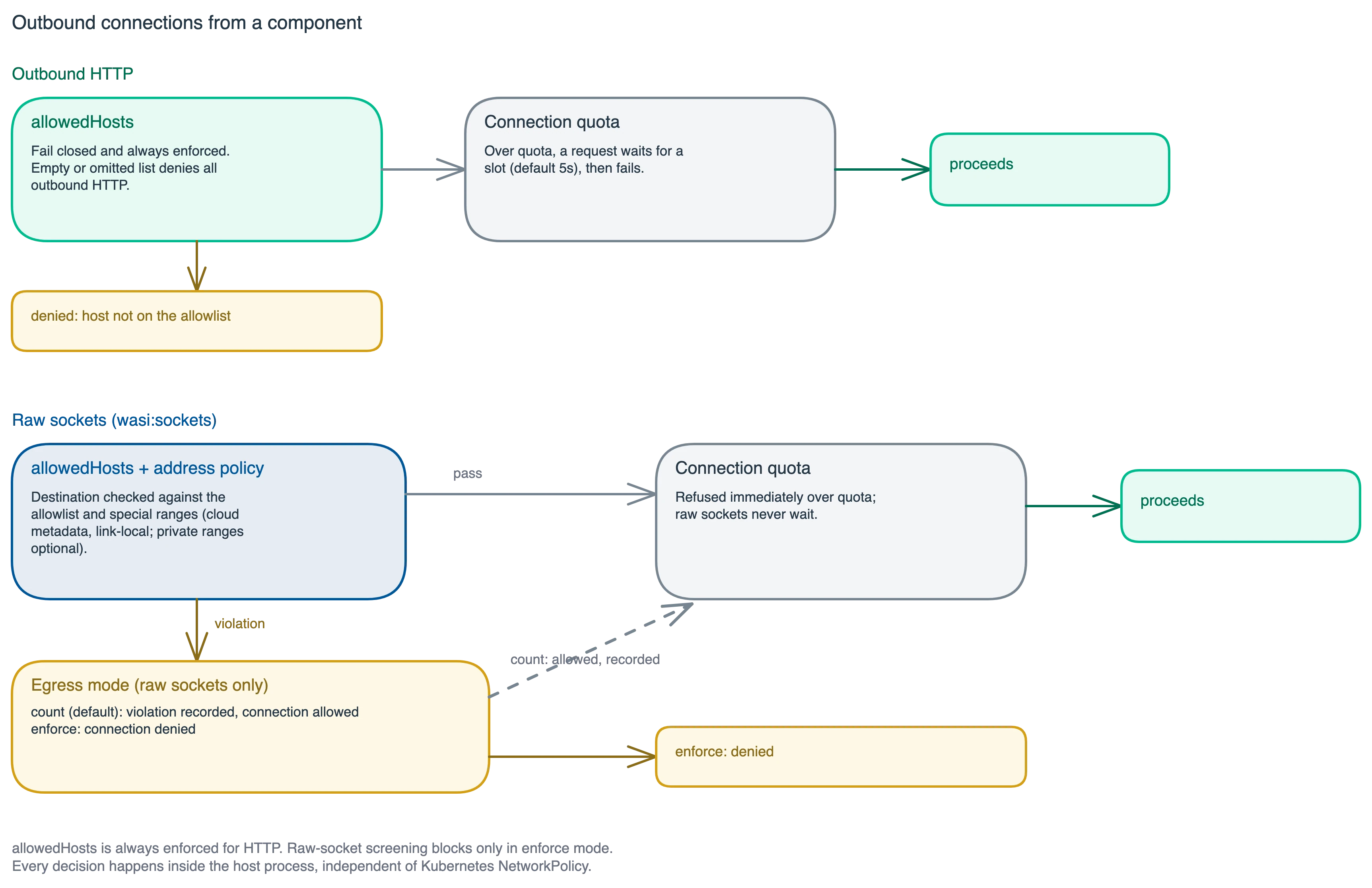
Entries are matched case-insensitively against the request's host (no scheme, no path). A leading wildcard like *.example.com matches any subdomain but not the bare example.com — list both if you need both. When allowedHosts is non-empty, any outbound HTTP request whose host doesn't match an entry is blocked by the host before it leaves the process. Since 2.10.0 the denial reaches the guest as a handleable http-request-denied error rather than a trap, for WASI 0.2 and 0.3 components alike. This is enforced at the wasmCloud level, independently of any Kubernetes NetworkPolicy.
The policy fails closed: if allowedHosts is empty or the field is omitted, all outbound HTTP requests are denied. To allow unrestricted egress, set allowedHosts: ["*"] explicitly. (Local development behaves differently: when the field is omitted from .wash/config.yaml, wash dev substitutes the allow-all policy so dev-loop workloads have unrestricted egress.)
allowedHosts controls outbound HTTP calls made via wasi:http/outgoing-handler. It does not restrict network access that may be available through other host interfaces that are explicitly bound to the component.
Allowing DNS name lookups with allowedIpNameLookups
DNS name resolution via wasi:sockets is denied by default: a component with no allowedIpNameLookups list (or an empty one) cannot resolve any hostname and must connect by IP address. Starting in wasmCloud 2.6.1, a component can opt in with a per-component allowlist:
components:
  - name: http-component
    image: ghcr.io/wasmcloud/components/http-hello-world-rust:0.1.0
    localResources:
      allowedIpNameLookups:
        - api.example.com
        - "*.internal.example.com"
Entries may be exact hostnames, *.suffix wildcards, * (any name), or literal IPs. Like allowedHosts, allowedIpNameLookups fails closed: resolution is denied unless a matching entry is present. The restriction is enforced by the wasmCloud host for both WASI 0.2 and 0.3 resolvers, independently of any Kubernetes NetworkPolicy.
The capability shipped in wasmCloud 2.6.0 under the name allowIpNameLookup and was renamed to allowedIpNameLookups in 2.6.1. On a 2.6.0 host, use the old name. The CRDs bundled with the 2.6.x Helm charts predate the field entirely: if your installed Workload/WorkloadDeployment CRDs don't include allowedIpNameLookups under localResources, the Kubernetes API server silently prunes it from applied manifests. The 2.7.0 chart bundles up-to-date CRDs (and upstream CI now checks chart CRDs against the operator's definitions), but note that Helm only installs the crds/ directory on helm install, never on helm upgrade, so clusters upgrading from a 2.6.x chart still need to apply the updated CRDs manually.
Note that allowedIpNameLookups governs the wasi:sockets name-lookup interface (i.e., resolving hostnames for raw TCP/UDP connections). Outbound HTTP through wasi:http/outgoing-handler is resolved by the host's own HTTP client and governed by allowedHosts, so HTTP-only components don't need entries here.
Raw-socket egress policy and connection quotas
The host consolidates every socket decision into one per-workload policy, backed by connection quotas:
- Raw-socket egress policy. Raw
wasi:socketsconnections are evaluated against the workload'sallowedHostsand an address policy that screens special ranges (link-local including cloud metadata endpoints, multicast, and documentation ranges; optionally private ranges). Because raw-socket connects were never gated before, enforcement is opt-in: the host's--socket-egressflag defaults tocountmode, which only records would-deny counters. Run incount, watch the counters, then switch toenforce. Companion flags:--deny-special-ranges(default on) and--deny-private-ranges(default off; reaching a sibling service on a private address is the ordinary in-cluster case). Since 2.10.0 the policy also screens inbound traffic (listens, accepts, and received datagrams), and host plugins carry their own egress ceiling of the same shape, declared on the plugin'spluginsentry. - Connection quotas. Each workload gets one connection quota across three surfaces: pooled outbound HTTP/gRPC connections (default 128 per workload; a request over quota waits up to
--http-connection-wait, default 5s), rawwasi:socketsconnections (default 256; refused immediately rather than waiting, to avoid self-deadlock), and inbound connections (default 256). Per-surface flags (--max-outbound-http-connections-per-workload,--max-outbound-socket-connections-per-workload,--max-inbound-socket-connections-per-workload) and a host-wide ceiling (--max-connections; when unset, derived from the process's file-descriptor limit) tune these. - Host ingress ceiling. Since 2.9.0 the host also bounds its own HTTP listener with
--max-http-ingress-connections(default: a quarter of the descriptor limit, floor 256). Connections past the ceiling are accepted and immediately closed, so the host stays responsive, and the host raises its soft file-descriptor limit toward the hard limit at startup. - Host loopback access. The reserved name
host.wasmcloud.internalis the one sanctioned path from a workload to the machine's loopback, gated by the per-componentallowedHostLoopbackPortslist and the host-level--allow-host-loopbackflag (off by default), a two-key grant.127.0.0.1continues to mean the workload's own virtual loopback.
Guest UDP binds are loopback-confined like TCP binds, outbound HTTP connections are pooled per workload with keep-alive (workloads never share a TCP connection, and TLS session resumption is isolated per workload), and outbound HTTPS trust roots are configurable for private-CA environments (--http-client-ca-path, --http-client-trust-roots).
Outbound client identity (mTLS)
Since 2.10.0 the host can present a client certificate on components' outbound HTTPS when a peer requests one: --http-client-cert-path and --http-client-key-path (PEM, both required together), or runtime.clientIdentity on Kubernetes, which mounts a kubernetes.io/tls Secret.
--http-client-identity-refresh re-reads the pair on an interval for rotation: new connections pick up the new credential, and a failed re-read keeps the current one. The flag is also what turns on expiry checking, and with it expiry is fail-closed: the host refuses to start with an already-expired chain, and a credential that expires while resident stops being presented rather than offered stale, logged at error. Without the flag the pair is read once and never re-validated, so set it (the chart does, at 30s) whenever the identity has an expiry that matters.
The identity is host-wide, which on Kubernetes means host-group-wide, since a group's hosts share one configuration. Every workload authenticates as it, so a workload with broad allowedHosts can cause the host to disclose the certificate to an arbitrary endpoint. Pair it with narrow allowedHosts, and keep untrusted workloads on a host group without an identity.
Same-host local routing
Since 2.10.0, a host started with --http-local-routing (runtime.hostGroups[].http.localBypassRouting) serves a workload's outgoing HTTP in process when the hostname matches a co-located workload's localRoute declaration. Like host loopback, it is a two-key grant: the operator enables the host key, and the target workload declares the names it serves. The caller's allowedHosts is checked before the short-circuit, so local routing never widens egress policy, and localRoute names are never reachable from the network.
The trust model is the operator's to judge. A localRoute claim is not proof of ownership: any workload on the host may claim any hostname, including one a neighbor calls over HTTPS, and receive that traffic in plaintext. Locally routed calls also bypass ingress auth, rate limits, mesh mTLS, and NetworkPolicy. Enable local routing only on host groups whose workloads trust each other.
Kubernetes NetworkPolicy for host pods
The runtime-operator Helm chart ships default NetworkPolicy resources for the operator, NATS, and each host group pod. These are enabled by default (networkPolicy.enabled: true); set to false to disable them — for example, when a CNI without NetworkPolicy support or a service mesh is managing pod-to-pod traffic. For environments that need to further restrict or extend the policy, apply an additional NetworkPolicy manually; Kubernetes semantics are additive. Note that traffic served by same-host local routing never reaches the pod network, so no NetworkPolicy applies to it.
The example below is a self-contained baseline for teams applying their own policy from scratch (for example, on an install where the chart-shipped policies are disabled).
Host pods carry the labels wasmcloud.com/hostgroup: <group> and wasmcloud.com/name: hostgroup. A baseline policy that allows only the traffic the host pods need looks like this:
apiVersion: networking.k8s.io/v1
kind: NetworkPolicy
metadata:
  name: wasmcloud-hostgroup
  namespace: default
spec:
  podSelector:
    matchLabels:
      wasmcloud.com/name: hostgroup
  policyTypes:
    - Ingress
    - Egress
  ingress:
    # Allow the Runtime Gateway to forward HTTP requests to host pods
    - from:
        - podSelector:
            matchLabels:
              wasmcloud.com/name: runtime-gateway
      ports:
        - port: 80
  egress:
    # Allow outbound to NATS for control-plane communication
    - to:
        - podSelector:
            matchLabels:
              wasmcloud.com/name: nats
      ports:
        - port: 4222
    # Allow DNS resolution
    - ports:
        - port: 53
protocol: UDPThe exact pod label selectors depend on your Helm release name and values. Verify the labels on your gateway and NATS pods before applying this policy:
kubectl get pods --show-labels -n <namespace>If your components make outbound HTTP calls via wasi:http/outgoing-handler, you will also need to add egress rules for ports 80 and 443 to allow those requests to leave the host pod. Combine this with allowedHosts for defense in depth — NetworkPolicy enforces the Kubernetes-level boundary, while allowedHosts enforces the wasmCloud-level boundary.
Related documentation
- Roles and Role Bindings — RBAC for the operator and gateway ServiceAccounts, including namespace-scoped restrictions
- Secrets and Configuration Management — supplying sensitive values to components via Kubernetes Secrets
- Custom Resource Definitions — full field reference for
allowedHosts,hostInterfaces, and other workload controls