Transcript: wasmCloud 2.12 for WebAssembly on Kubernetes: DaemonSets, Plugin Secrets, and 163,000 Workloads per Host
Transcript
Bailey Hayes 0:15
Hello and welcome to wasmCloud's community call for November 4. It's our first one of November. We're getting close to the end of our quarter, if you factor in holiday time, so we should probably give an update on that today. But more than anything, I'd like to welcome a new member on the call. Will you say your name and introduce yourself to the folks here?
Saleh Hassen 0:42
Yeah, sure. I'm Saleh. I've been a software engineer for a few years, five years now. Happy to learn anything and everything about Wasm. Somewhat of a beginner. Heard interesting things from Liam's talk last weekend at BSides NoVA, so thank you.
Bailey Hayes 1:05
Thank you and welcome. And if you haven't joined our Slack, there's a pretty active WebAssembly community there as well. We're going to dive into some of the new stuff, and I think we've got a couple of different demos today, which is going to be fun. I'll share my screen really quick so people can see where we're at.
First things first. Last night we released wasmCloud 2.12. That's probably going to be our last release before KubeCon. I want to keep things stable while I'm on stage with Eric on Wednesday. We're going to do some pretty cool stuff, and we'll start dropping some hints on that throughout the week as we make our demo great and get it working all the way end to end. Like any good conference demo, it's in the last week when it all comes together.
We dropped a bunch of new features for this past release. Jeremy in a bit is going to talk to the workload daemon set support that he added, and also plugin-backed secret support. And we also had three new contributors, so thank you, folks. cvas22 for Postgres parameter type validation. Thomas Dravigney, potentially the way you say your last name, for correct handling of deleted NATS blobstore objects, and also a pretty significant contribution around per-binding credentials. Do note that I also made another follow-up change on top of that that extended it even further. And mackaby fixed nonblocking UDP receives, so basically if you have an empty socket, you're not going to get a weird error. There was a handful, or a hand-ton it seems, of bug fixes that landed here. We have a release blog that will be coming up shortly. But if you want the more difficult to read, but still accurate, version of all the things that landed in this release, see the release tag here.
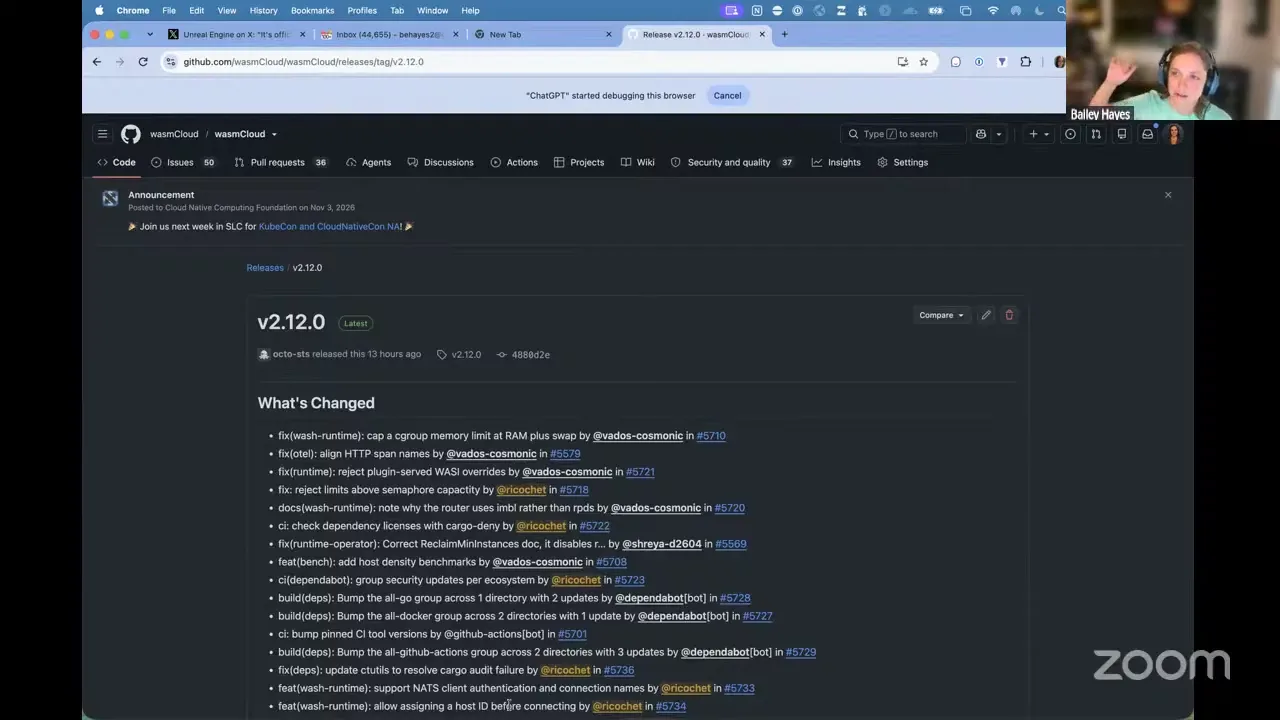
One last thing I'll shout out from the rooftops, and we'll be talking about it at the Security Slam session next week: we've now passed Silver for the Best Practices badge from OpenSSF, which basically means we've got 80% test coverage. So a lot of these were filling in tests. And we are now officially targeting OSPS Baseline Level 3. That's kind of the highest bar you can meet in terms of having a secured, best-practice project. There are a few things remaining on that that we're shoring up in the other repos outside of the wasmCloud/wasmCloud repo, like wasmCloud TypeScript and Go and wasmcloud.com. But I expect probably sometime this week we'll also be meeting that and get that badge, which is pretty cool.
I don't think I'm going to go through all of these. There's too much to say, other than it's pretty awesome. Please give wasmCloud 2.12 a try. Next up in our agenda: Victor, if you're on and ready to talk, would love for you to share some of the stuff that's landed for workload startup performance and density, and the new benchmark that you added. No audio yet.
Victor Adossi 5:02
Yeah, should I do that right now?
Bailey Hayes 5:02
Yeah, please do it right now. Thank you.
Victor Adossi 5:04
Oh, okay. Sorry, my bad. I was down in the agenda, so I wasn't actually sure what the order would be. Okay, so hey everyone. I've been working on some scale improvements lately on wasmCloud, so it's been a long chain of commits. I think individually they've been a little bit hard to follow, maybe, and a little bit difficult to tell exactly what we were getting at. I tried to break them up such that it was somewhat possible to tell with most of the changes. I'll throw up the recent changes so everyone can see them. Let me share my screen here. Oh, the host needs to enable it. Classic.
Bailey Hayes 6:05
Okay, sorry, man. No worries. You should be good to go now.
Victor Adossi 6:09
Okay, here we go. I'm just going to share my whole screen since that's easier. So everyone should be looking at the list of recently merged PRs on wasmCloud. It's this group of PRs here.
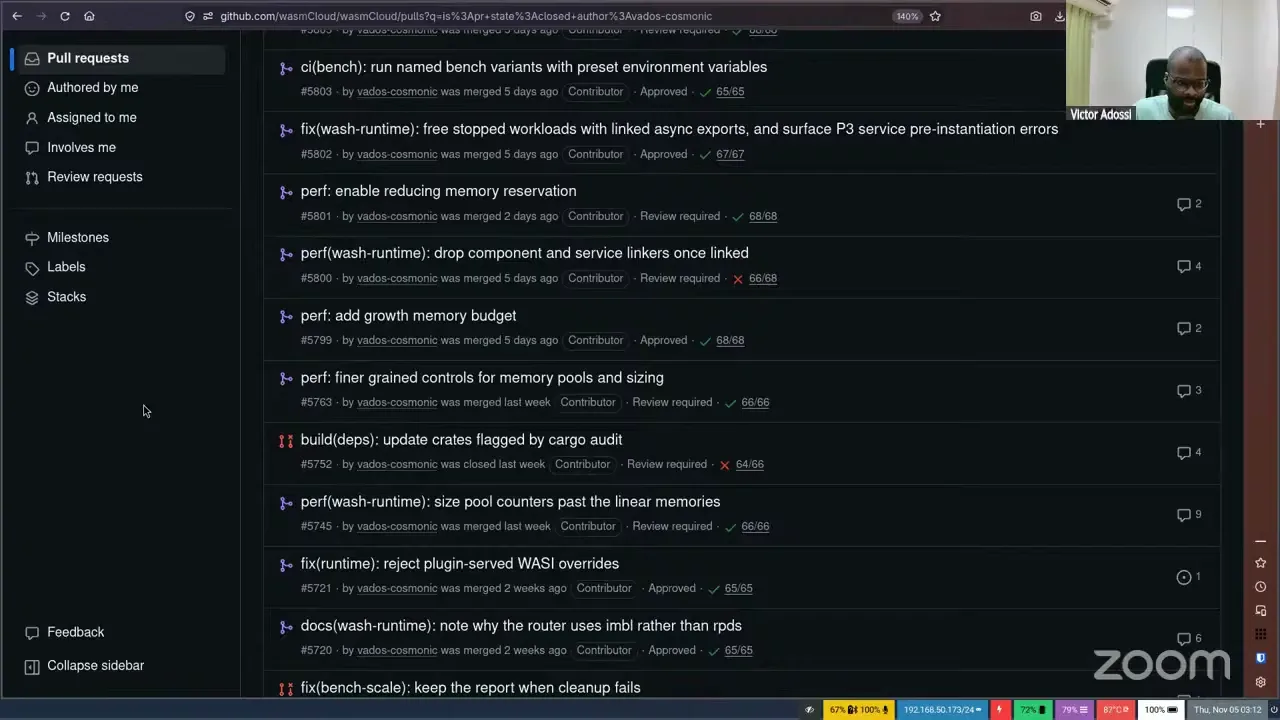
So to get into it really quickly: wasmCloud is built on Wasmtime, which is the Bytecode Alliance-maintained project, a Rust project that serves as the WebAssembly host. You can think of it as essentially a virtual machine. For people who are new to WebAssembly, you can think of Wasm binaries almost like JARs. They're a bytecode, a compile target, and you have a host that can run that bytecode. Same as Python: Python compiles to a bytecode and then gets run in an interpreter. Wasmtime is different in that it has both a compilation-to-machine-code mode, using Cranelift, and an interpreted mode called Pulley.
The important thing here is that we built wasmCloud on top of Wasmtime to make it easier to use, more robust, and to fit all these application workloads and different things you'd want to do with Wasmtime that would be hard to do if you were doing it all yourself. So we add functionality on top of Wasmtime.
These performance changes, in particular related to scale, help manage memory settings, and also avoid some CPU load. But mostly, the thing that actually stops scale, unlike, let's say, containers or VMs, in a Wasm context is access to memory. There are lots of things you can do to reduce memory usage for every individual workload, and this is memory that has to be resident while your program is going, while the host is going. So you can see we do a whole bunch of things to count and manage linear memory. Linear memories are the kind of memory that WebAssembly components use, and modules as well. And then we add budgeting and manage the growth of the memory. We don't necessarily shrink unless you unload the component.
The last thing, which I think wasn't here the last time we talked about this, was reducing the memory reservation. By default, when you're using Wasmtime, it will reserve about four gigs of space, and this is virtual memory, for every one component. The reason it does that is because your component can actually go faster if we know that no memory access can go outside a 32-bit pointer. Memory addresses are computed as the base plus the offset, and two to the 32 is about four gigs, so you know you can't jump out of the memory range of one component. You can actually turn that off. Turning that off does not make the component instantly unsafe. It just makes Wasmtime do checks on memory accesses. That means you run slower, and it means that if there is a bug in the underlying engine, components may be able to access memory of other components, like a sibling instance, which of course could be bad depending on your security model.
But anyway, the point is a whole bunch of changes to reduce memory usage and make memory more configurable, and as a final step, removing the safety-focused memory reservation means that we can run many more workloads on a smaller amount of memory and a smaller amount of CPU. So I'll jump straight to the results here. I think I'm going to have to zoom out, but hopefully people can still see this reasonably.
Victor Adossi 11:13
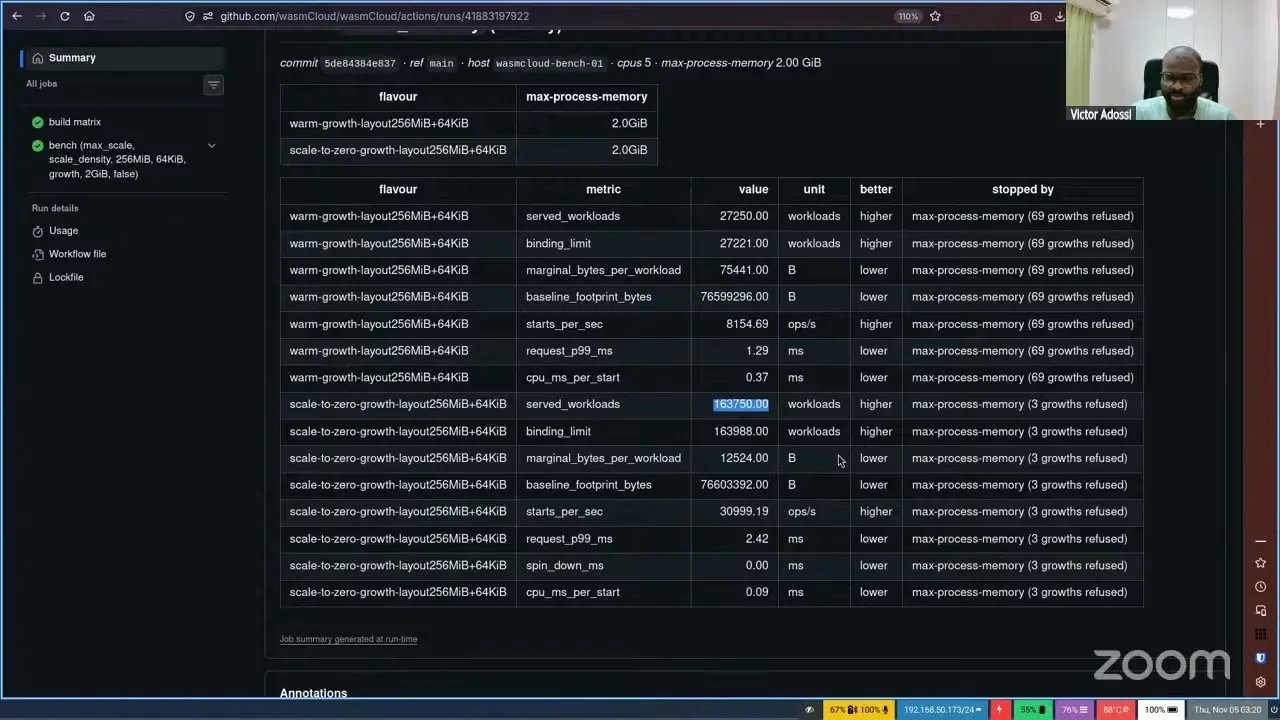
So with everything turned on, we call this our max scale benchmark. Warm components: this is an HTTP component that we're testing and scaling, and warm means that it stays in memory. It's not scaled to zero. Essentially, it's either scaled to zero or held in memory the whole time. We can get 27k components running on two gigs of memory and five CPUs. This is way more dense than just about anything else, and actually also more dense than other Wasm-based solutions out there. I think there are a few other projects that are somewhere around 4K or something like that. It turns out you can do a lot better, and I'm sure there's still more we can do with this. And of course, two gigs is not very much for a server. Increasing the memory would instantly increase the number of workloads we'd be able to run and keep warm.
Bailey Hayes 12:28
Also, five CPUs, not much. And the other thing I'll add is, because we're super cheap, we're paying basically 35 euros a month from Hetzner for this bench box, and I picked the older version of Ryzen 5. So yeah, this is like a...
Victor Adossi 12:45
It's very much consumer hardware.
Bailey Hayes 12:47
Yep, crappy consumer hardware.
Victor Adossi 12:49
Yeah, and the average M1, M2, M3, M4, M5, the Apple series of machines, will do much, much better than this. We've also added some code to make sure that on Apple machines, running at such large scale doesn't OOM. One of the bad things about Apple that I think we mentioned before, that a lot of people find, is that if you try to run an LLM workload or something like that, your machine just shuts off or freezes if you use too much memory. So we detect that and have knobs as well to try and limit it.
But that's the warm stuff. That is keeping all the memory required for a component, so it can respond at any time, for every one of the 27k spawned components. If you actually go scale to zero, which is something we can do, we can spin up a component on an incoming request. The number of components you can spawn in this test fluctuates, and it's about 170k. In this test it was 163k. So this is the number of served workloads. That's unfortunate, one second, let me see if I can... Nope, GitHub won't let me get rid of the left side here. But anyway, this is the number I've highlighted, so it's a little bit easier to get at.
So basically, for scale to zero, which means the component is registered and present but will scale up when it's needed, you can fit 163k of these components on five CPUs and two gigs. For those who are doing the math in their heads: oh, sorry, and also the P99 request is still two milliseconds. Now this is obviously on one machine. It is faster if you keep them warm: we have the P99 here for the simple component at 1.29 milliseconds. So it's not quite a doubling, but P99 does go up if you keep it scaled to zero. But on a machine with more memory, if you just imagine, let's say, 4x the memory, 5x the memory, you can get over a million of these workloads that are scaled to zero on one machine.
So we think this is a pretty good spot to start from. In the ecosystem of things you can do to isolate code that is running on your computer, this is the densest it gets, other than maybe doing a whole bunch of green threads in a single process. But even V8, a lot of people use V8 engines, or Monty is a new thing. Even a lot of those are hard to get to exactly this scale, and especially without the safety guarantees. So yeah, this is the scale work we've been doing. I think Bailey teased it a little bit, but this is one of the things we're going to be showing off real soon. You can casually get a million of these workloads that are isolated in a way that most things are not on the machine, scale them to zero, scale them up, and still have decent performance. You still have two milliseconds per request. So yeah, that's it. Anyone have any questions?
Bailey Hayes 16:47
This is freaking awesome, Victor. Thank you.
Victor Adossi 16:51
Yeah, it was nice. I don't know if this is the limit, but we're doing well at the very least. I'm not sure we're going to see another order of magnitude. I mean, it's been 10x...
Bailey Hayes 17:09
...orders so far, by the way, guys.
Victor Adossi 17:11
Yeah. The thing is, right now the layout is 256 megabytes. If we knew some workload was really not going to use any memory, and let's say just do streams in and out, you could reduce that to 25 megabytes. You could reduce it to 10 megabytes. At that point it becomes kind of workload specific. And of course, if we had an even smaller component... it really depends on what the component does. We've done an HTTP component, and there's a balance on how small that can be. But there's maybe another 10x in here, could be. But I think right now we're definitely at a scale where we've got to wait for the rest of the world to try and run a million things on one machine first, before we bother to try and scale up even more.
Bailey Hayes 18:13
So just to put it in your minds: we used HTTP here because that's a great representative workload. Imagine if it was communicating over an HTTP-compatible OpenAI interface. This could easily be an agent that is scaled to zero, secured, sandboxed, and running at a min scale. Something that is I/O bound, and not CPU bound, is a really good use case for WebAssembly, where we're able to scale it down and then immediately way, way up.
Victor Adossi 18:47
Oh, and another application of this: I'm sure people have heard of Muse at this point, Facebook's agent that's essentially free to anyone who uses Meta services. They're trying to have two vCPUs for every person that uses the service, and of course that is an insane amount of compute, especially when so many people use their services. This changes the calculus for that immensely.
One of the things we talked about, I think it was last week, was that project where they were running a RISC-V computer in WebAssembly. So think of running 27k RISC-V Linux boxes on one machine, versus having to run one that grabs a whole CPU, or, technically, if two threads is one CPU, there's obviously a very big limit, and a lot of times you over-provision. It doesn't scale to hundreds, but this scales to tens of thousands. Go ahead, Aditya. Oh yeah.
Bailey Hayes 20:14
Aditya, did you talk about that last week or two weeks ago?
Aditya Salunkhe 20:18
I think two weeks back. And just an update: I'm working on a multi-CPU board for that, so that it works with the Wasmtime threads proposal, so you have multiple threads and it works really fast. In my testing, with four threads, it was around eight times faster, which was still around 60% slower than a native machine, but it's somewhere.
Victor Adossi 20:53
Yeah, that's pretty good. 60% slower.
Aditya Salunkhe 20:58
Wait, I think it was 40%. 40% slower, yeah.
Victor Adossi 21:01
40% slower, 60% of native performance. That sounds bad, but considering how fast computers are in general... RISC-V is not necessarily the fastest architecture out there, but computers are pretty fast, and it depends. A lot of the slowdown comes from the layers on top, and being able to get rid of those layers can help. People use Python, right? And if it's I/O bound, it doesn't really matter necessarily for Python. But there are lots of people wasting compute. I think the density benefit there, for many cases, will outweigh the performance loss.
Bailey Hayes 21:52
The comparison I like to use: this isn't even an order of magnitude off, right? My rule of thumb is that if you're 2x slower than native, you're within threshold. You're doing pretty good. Compare that to JavaScript and Python, which are usually 60 times slower than native. So what Aditya is talking about is still near-native speed, which is incredible. If you haven't seen our community call from a couple of weeks back, I totally recommend watching it, if only just to see Victor totally freak out at the amazingness of Aditya's POC there and his idea. I think the future is bright for WebAssembly work. That one is one of the coolest things I've seen in a long time.
All right. Well, next up, Jeremy, would you be game to talk through some of the new features that you've added? The daemon set style placement for workloads, and then also host component plugin support with secrets.
Jeremy Fleitz 23:07
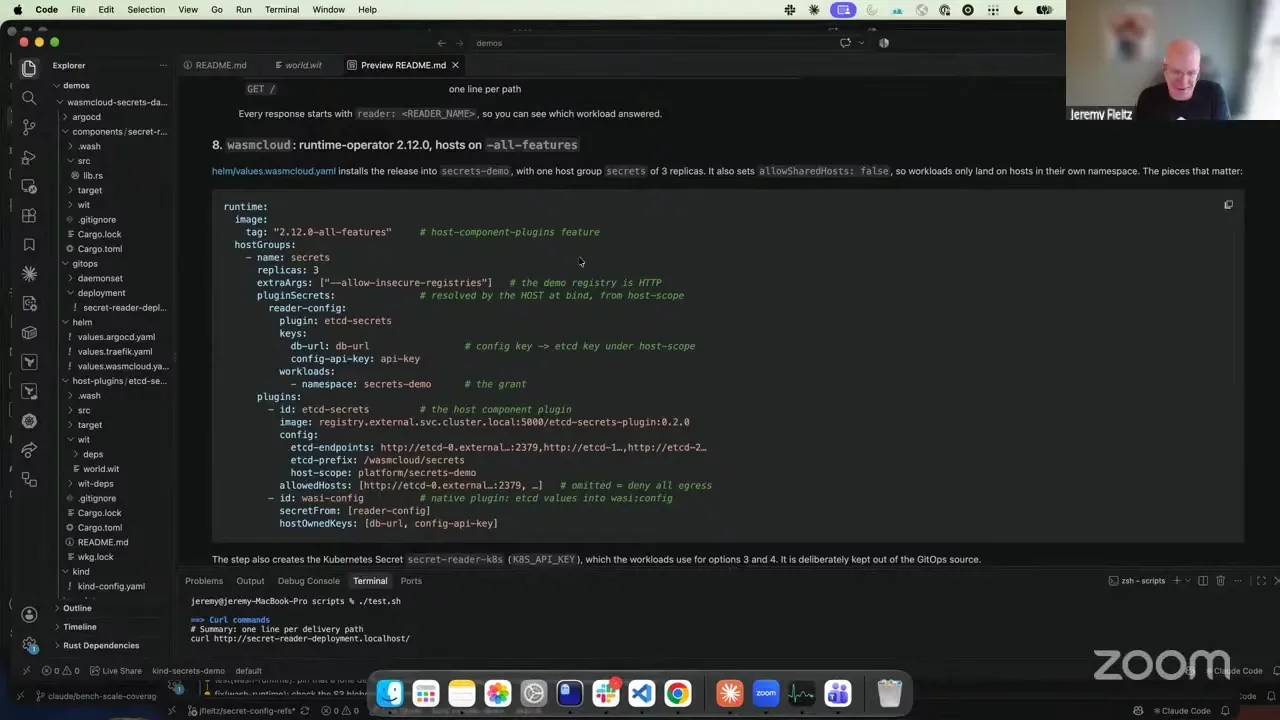
Yes, absolutely. Let's see here. Oh, wrong screen. There we go. Okay. Just first starting off, I did mention this last week, but a lot of people were at the Plumbers Summit for the Bytecode Alliance. This did land in 2.12.0. Just a quick reminder: when we build wasmCloud, we also have a container image that's built every single time called all-features, which enables any features that are behind a build flag. One, for example, is enabling host component plugins. So using the 2.12 all-features image, I made a quick example here of creating a host secrets plugin.
Now, the reason why you might want a host secrets plugin: when you get secrets in a typical Kubernetes pod, you use Kubernetes Secrets. Kubernetes Secrets are base64-encoded, and the cluster needs to be configured correctly to have encryption at rest, et cetera. So there are times when you don't want to use Kubernetes Secrets as your secret source. HashiCorp Vault and others have solved this type of problem by creating sidecars that go onto pods, and then retrieve secrets at that time and either mount them as a config file or inject them as environment variables. That way your application doesn't have to change. That doesn't really work with wasmCloud, since we are running a host pod by itself with thousands upon thousands of workloads, like Victor just showed.
So what this provides is a plugin that runs on the wasmCloud host, customized for exactly how you want to retrieve your secret, which then provides that secret to each workload securely. What I did here is make a very simple host plugin called host-plugin-etcd-secrets. This uses an external etcd cluster outside of Kubernetes as my source of truth for secrets. It's managed completely outside of Kubernetes, so it's not going to be accessible by the kubelet or the Kube API, et cetera, and it only has access to what I give it. In my local kind cluster, only my plugin has access to hit this etcd cluster.
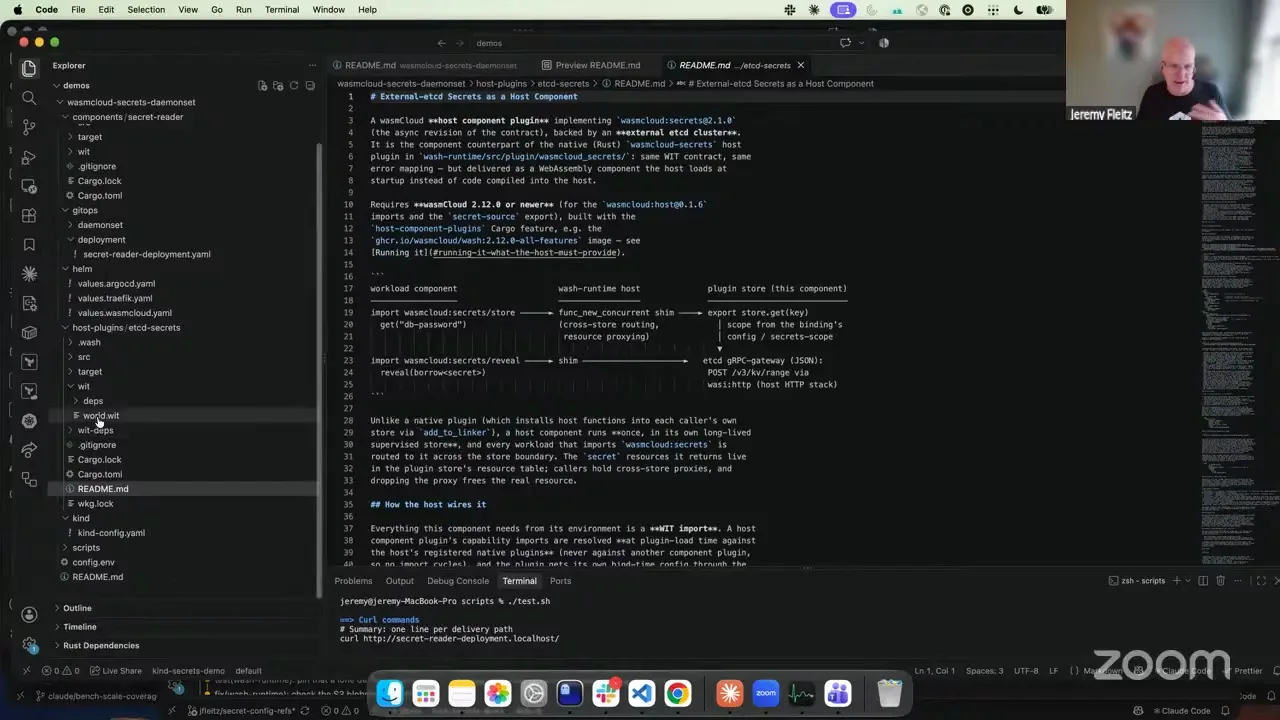
This plugin implements the wasmCloud host secret source provider interface, and that allows me to load it as a secret host plugin into my host. Nope, I'm in the wrong spot here. One second. Where's my README preview? Okay. The way you configure this: on my host, I created a plugin right here called etcd-secrets. I'm loading my secret image, and then here's my configuration on how to get to it. And then obviously I have to give the plugin the ability to call my external etcd cluster.
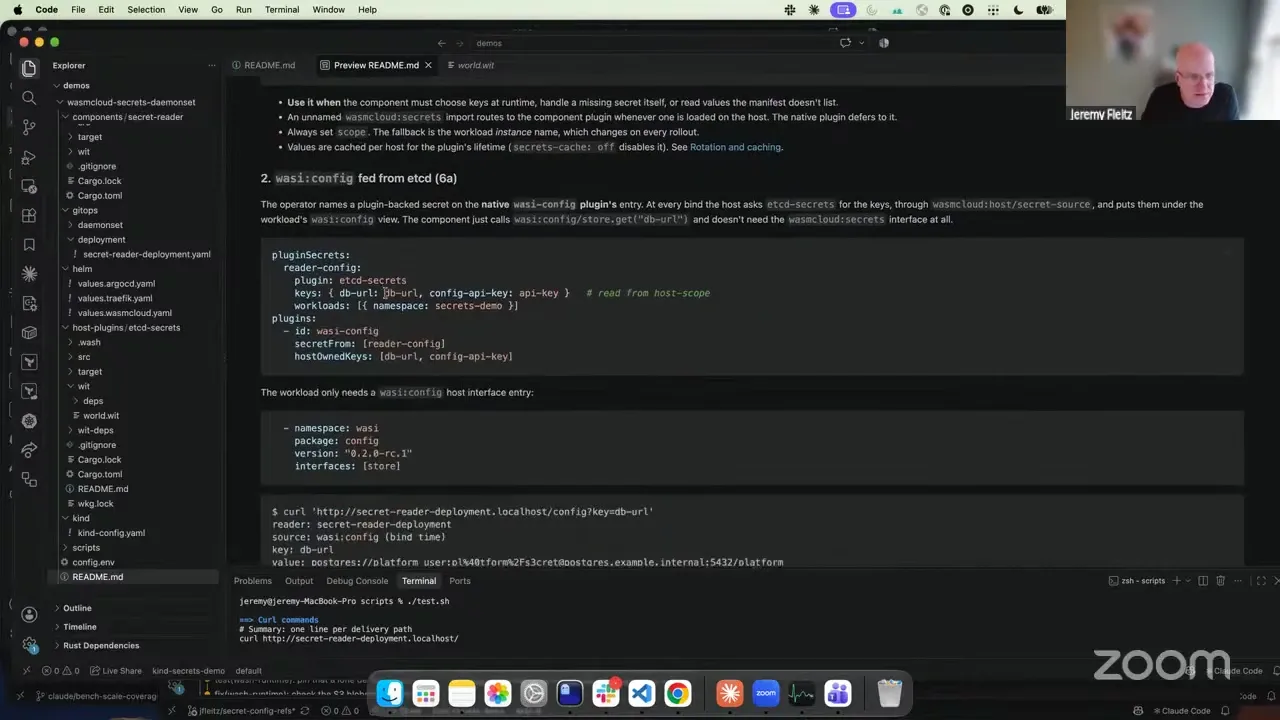
Now the new thing is that inside the host group, I have what's called plugin secrets, and that allows me to configure a plugin to be my secret provider. In this case I'm saying for reader-config, I want it to use the etcd-secrets plugin, and then I can specify what keys I want it to provide. I can also limit which workloads are allowed to get to this plugin. Right here I just said namespace: everything that's deployed as a workload into this namespace across the demo can get to this. But I can refine this down to a particular workload name. I can grant everything in a namespace, but also call out a separate namespace and workload combination if I want to. That way it further locks things down, so nothing can go in and get a secret it shouldn't.
This plugin can be called directly from a workload deployment, and I'll show that using the wasmCloud secrets interface. But you can also configure wasi:config, your standard native wasi:config plugin...
Jeremy Fleitz 28:06
...so that instead of using Kubernetes Secrets as the backend, I can say secret from reader-config, and it'll pull those values from this external plugin. I'll show that inside a workload, pulling the secrets just through config, so I don't have to add an additional interface for going to wasmCloud secrets. Just showing this really quickly here: this is the first example, getting the secret from the reader. Once again, I've got plugin secrets, reader-config, here's the values and what's configured. Then inside the workload itself, I just simply say wasi:config, and I'm able to get to that.
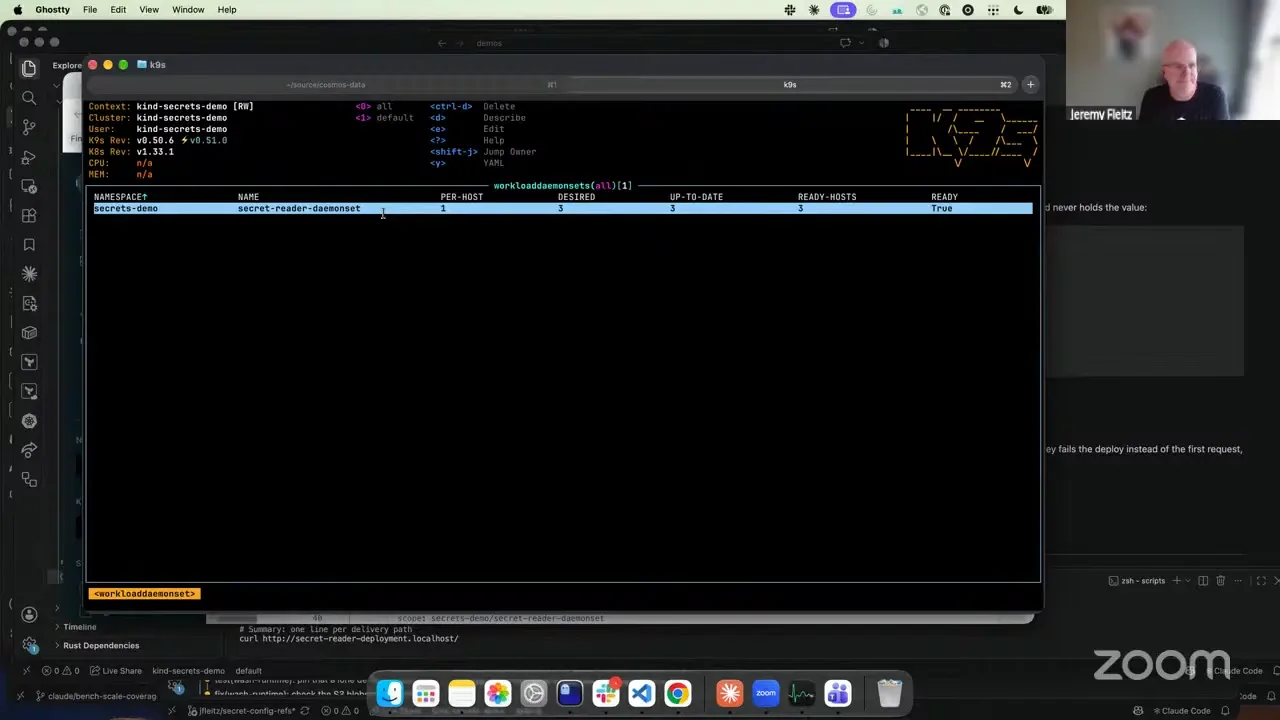
If I want to call it directly from the host... this is a little bit out of order, I just rebuilt this. All right, hang on. Let me switch over to my kind view. This is a lot easier. Let me bring up my workload daemon set. Inside this workload, right here, I'm using the wasmCloud secrets interface, and I can call directly and retrieve my secret. I have it deployed as secret-reader-daemonset, and I'm also saying here are the interfaces I want to be able to call: store and reveal. This way the workload, when it runs, can retrieve the secret at call time, versus at bind time, which is when config would get it. This one also does wasi:config as well. So that's the secret side of things.
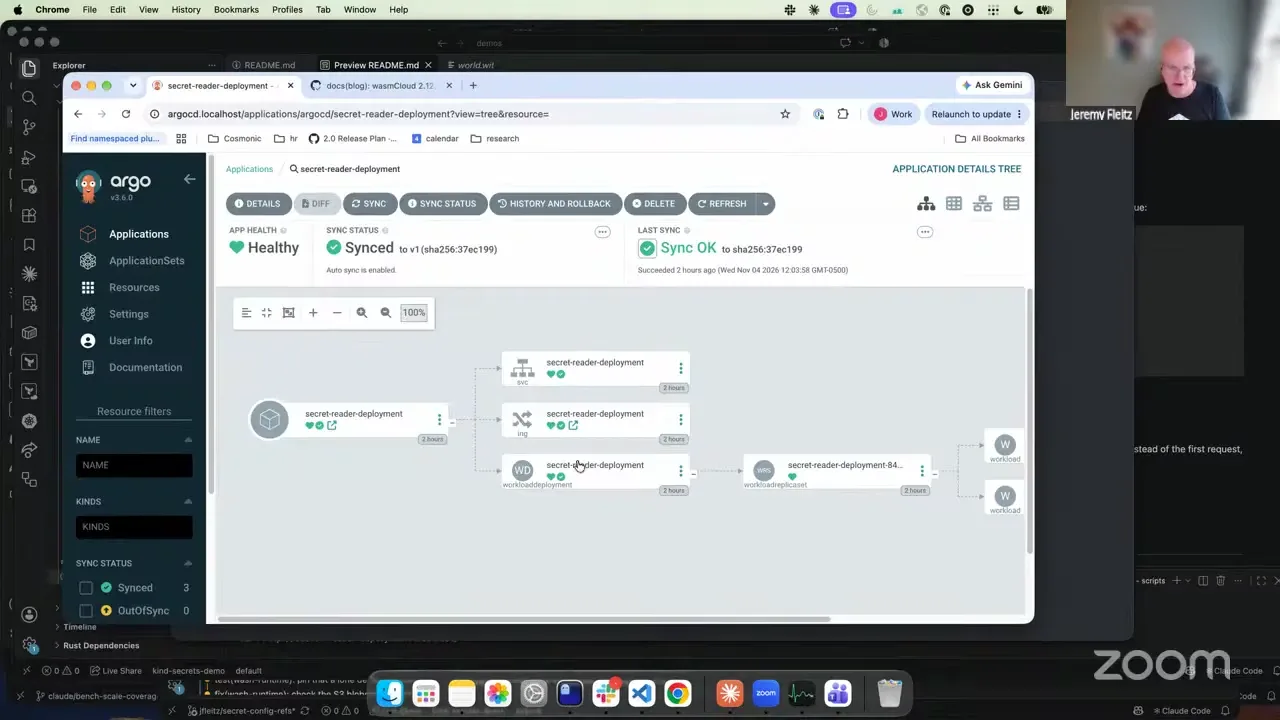
One other change that was also done while working on this: we fixed a bug in Argo CD, which wasn't showing the health indicator progressing all the way down to each sub-resource. In this exact same demo, I had Argo CD running on localhost, with all my stuff deployed through Argo CD. Starting with the deployment here, I'm able to see my workload deployment, and the heart is the healthy indicator. It used to just show up to this point, and there was no visibility below that. But now I can see my workload deployment here in a healthy state. If you look at the status conditions, everything's true and synced and happy, and that's what makes the green heart show. And now when I go down to the workload level, I get that exact same type of status condition as well. So each thing is progressed all the way up to the top. From a platform engineer's perspective, I've got full visibility from a health perspective all the way down to the WebAssembly component.
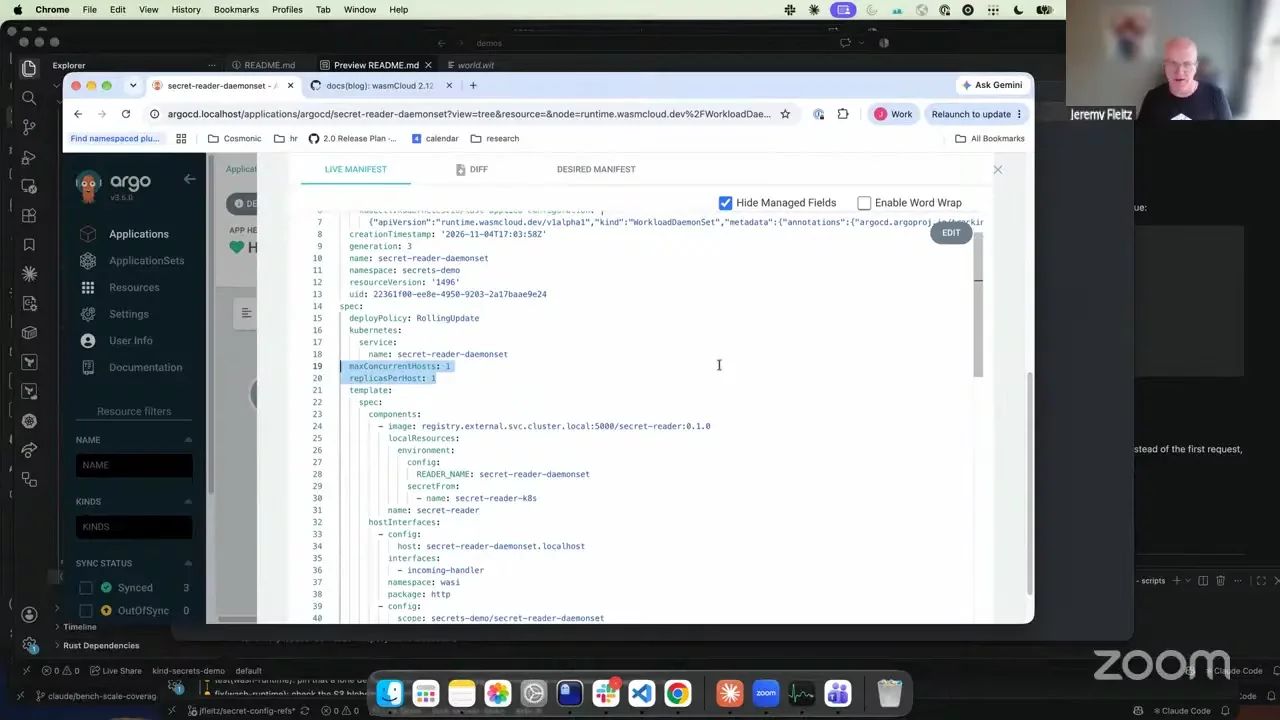
I was just glancing over this new thing we also added, and that is the workload daemon set. That's a brand new type right here. If you notice, it's the exact same basic structure as our workload deployment, which is completely on purpose. We're mimicking Kubernetes: deployments with pods, and workload deployments with workloads. That's not just because it's easier from a platform engineer perspective, but also because Kubernetes won. So we want to follow the standard, because we do feel that is the right approach. And it works like a typical daemon set.
Jeremy Fleitz 32:27
The two fields I'm going to call out right here: we have replicas per host, and that's the number of instances that are deployed per host for this daemon set. And then max concurrent hosts, which might change in the near future because I don't really like the name. This is the number of hosts that are allowed to be updated at a time when you do a rollout. Right now I have this set to one, which means if I update this component and I have 10 hosts, the first host will get updated, and after it's done and ready, the next host will get updated, then done and ready, one at a time. If I set this to two, two will get updated, and once at least one comes up, it moves on, so it goes way faster. So we're probably going to make this more like max in-flight, or I don't know. I have to work on the name, but it's probably going to change.
So going back to the kind...
Bailey Hayes 33:32
In Kubernetes land, I think max rollouts is a common one.
Jeremy Fleitz 33:37
Yes, that's a good call. That was the name I was trying to think of, and I couldn't. And then, going back to the kind view, which is a little bit easier here: per host, here's the desired state, up to date, and ready hosts. One thing to also call out: just like our workload deployments, you specify the host group that you want to deploy to, or even a shared host group, and it's the exact same thing with a daemon set. If you specify a host group, it's not going to go through every single host inside your wasmCloud cluster. It's really just the hosts inside that host group that it deploys to. And I'll pause for any questions.
Bailey Hayes 34:27
If it was confusing for folks, we have really good docs on this kind of stuff on our wasmcloud.com docs page. I think the main thing to recognize is that in wasmCloud we have an operator, and now it knows how to operate this new type of custom resource, which is really a mirror of what you would do with containers. In containers, you would create a deployment YAML. In wasmCloud, you create a workload deployment YAML, which has components in it instead of containers. Now this is the daemon set equivalent of that.
And then I also feel obligated to say: please use the wasmCloud secrets interface when you have secrets, because that means you get types all the way through, and everything is typed as a secret. That's really nice when you're asking, should I log this config value? Yes or no? The answer is no if it's a secret, but you don't know that if it's not typed.
Jeremy Fleitz 35:30
Okay. Well, I guess back to you, Bailey. And hello, Lachlan.
Bailey Hayes 35:38
Hi, Lachlan. All right. Well, I think that's mostly the demos we had prepped. Next week we're going to be at KubeCon, so we'll have a brief wasmCloud call, as is tradition, from the KubeCon floor at the wasmCloud booth. It won't be a normal community call. It'll be a KubeCon special call, probably by Jeremy. I think on that Wednesday we're actually speaking, so Eric and I will probably be over in the room getting set. So yeah, very exciting. Hi, you just came on video. I wonder...
Jeremy Fleitz 36:20
...if I can live stream that from your talk.
Bailey Hayes 36:22
I don't know. I think there are actually CNCF recording rules. Hopefully we don't get shadow banned from YouTube by the CNCF. That would be sad. But yeah, thanks everybody for joining today. I guess we've got time left, if folks have other discussion items they want to go through, anything that's coming up.
Oh yeah, Aditya, shout out! Thank you for all the PRs you've been putting in. I saw you just made the host component plugin one available. I'll give that another round. I'm super excited to use that. I kind of debated whether or not I needed that all the way through for the plugin secret support, because wouldn't it be nice if I could volume mount a secret and then load that through here, and that's how we do it. But luckily, we were able to say, okay, you can have one secret to kick this whole thing off. If you can tolerate one Kubernetes Secret that you're allowed to deal with, we'll thread that through and have it talk to Vault or whatever. But a volume mount might be something that's really palatable for people, because then it's not necessarily a Kubernetes Secret.
Aditya Salunkhe 37:46
Well, always happy to chip in.
Bailey Hayes 37:49
Thank you.
Aditya Salunkhe 37:51
Oh, I have something to discuss after the call.
Bailey Hayes 37:54
Okay. All right. Well, hey, thanks everybody for joining. I hope you have a wonderful wasmCloud Wednesday. I'm going to stop the recording now, so I can hear whatever cool thing.