Transcript: wash GitHub Actions & a Plugin System Built on Wasm Components
wasmCloud Weekly Community Call — Wed, Jul 23, 2025 · 61 minutes
Transcript
Brooks Townsend 02:11
Hey everybody, welcome to the wasmCloud community meeting for Wednesday, July 23. We technically have Bailey as the Zoom host today, so I always want to give folks the option. I think we've got a pretty fun community agenda for today — definitely not being written up at this exact moment.
One thing Bailey is going to take us through: as you saw last week, we've been working on a reimagined wash — the Wasm shell — that's essentially using plugins from the ground up as commands, as hooks into existing commands, and as something you can use to implement interfaces for your hot-reload developer loop. What Bailey started running into is that it's great to have a curl command or a package-manager install, but realistically, being part of CNCF and on GitHub, we're installing stuff all the time in GitHub Actions. It'd be really nice to have an architecture- and OS-agnostic, Wasm-like way to install wash so you can confidently do it on CI runs. We've made attempts at doing this properly before, and maybe they've fallen short. Bailey, you have a lot of fun things to talk about, as well as showing this action. So I'll throw it to you for the demo.
Bailey Hayes 04:03
Yeah. I primarily wanted to do this to try out Brooks's latest stuff on his reimagined wash — that was one of my big motivators. But I was also looking at the best way to maintain GitHub Actions for the Bytecode Alliance. So I wanted to survey the landscape, learn as much as I can, and share my exploration, some of the things I learned, and the decision criteria for what I think we should do for wash.
First, let's do a demo. This is a composite-style action, and what I'm doing is pretty simple: I'm wrapping an existing action that knows how to install to a cache with cargo install, and I'm pointing it directly at Brooks's latest and greatest so I can try things out. If I go over and see it run, I can see it successfully built my component and set up wash from the cache. We're all familiar with Rust here, and we know Rust compiles slowly — even for a hello world, it was 26 seconds to build. But actually getting my wash tool from the cache took one second, compared to an eight-minute setup if you didn't have a cache.
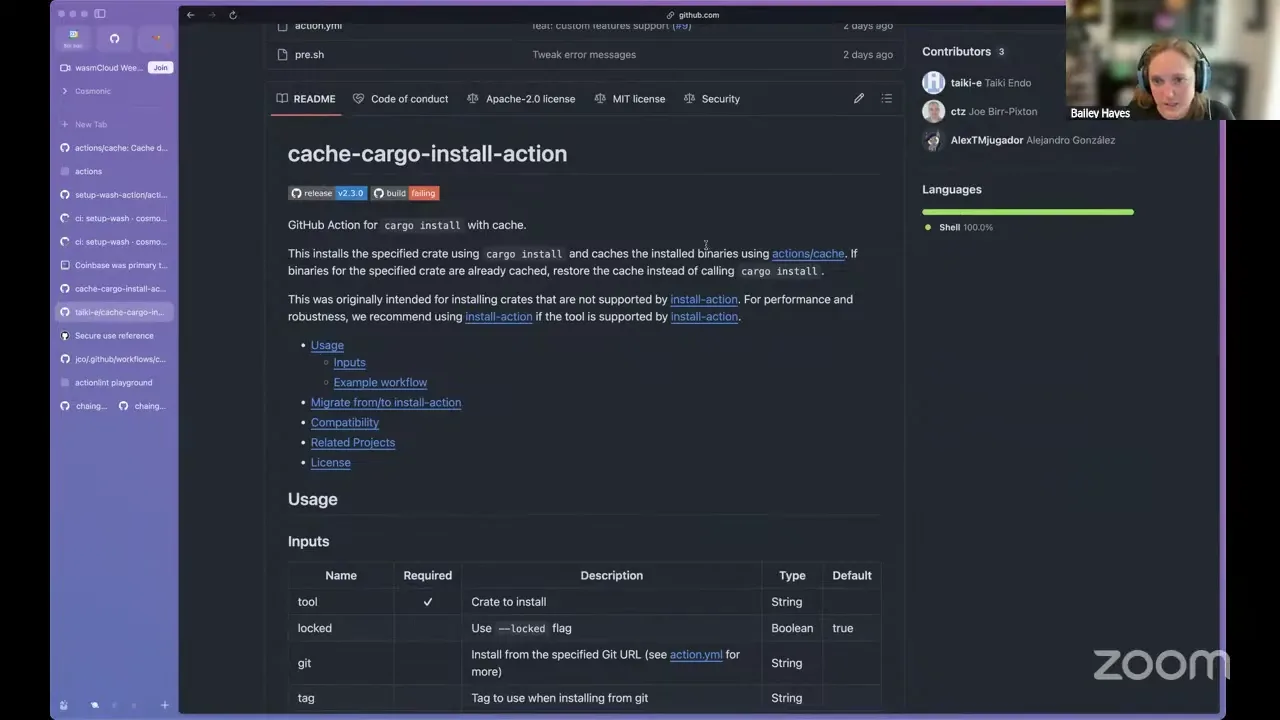
So this is what happens to your workflow: the first time you run the setup-wash action it says, "you don't have it, let me build it." Rust is installed on every Action runner, and it mounts this hosted tool cache of wash to your runner — in this case it's mounted per workflow, and that's how it's cached.
In GitHub Actions there are a couple of different kinds of cache, which is interesting. This one uses what's called the Actions cache — provided by GitHub, and your actions can interact with it directly. It's a nice way to cache, even between different workflows, intermediate dependencies you're building, like node modules or binaries. There's another tool in the ecosystem that builds on top of it: the tj-actions cache Cargo install action. It's nice because I can call through it and it builds on top of the Actions cache, so we don't have to write the cache-management logic ourselves.
The downside is that it's Cargo-specific. Cargo is the package manager for Rust, and if you're trying to use wasmCloud and you're maybe not writing Rust — because we support people coming in writing TypeScript and Go — knowing to find this tool name, and the very Cargo-like parameters, would be a little weird. You probably wouldn't search for this to get started with wasmCloud. So wrapping this action gives us the best of both worlds: we provide a canonical setup-wash action that anybody can pull down and get started with. We'll have logic for setting the right versions, and maybe a default set of plugins — pulling in the work Brooks is doing, prefetching plugins as an optional field people can supply in the workflow. That's why we'd still want our own custom setup-wash action.
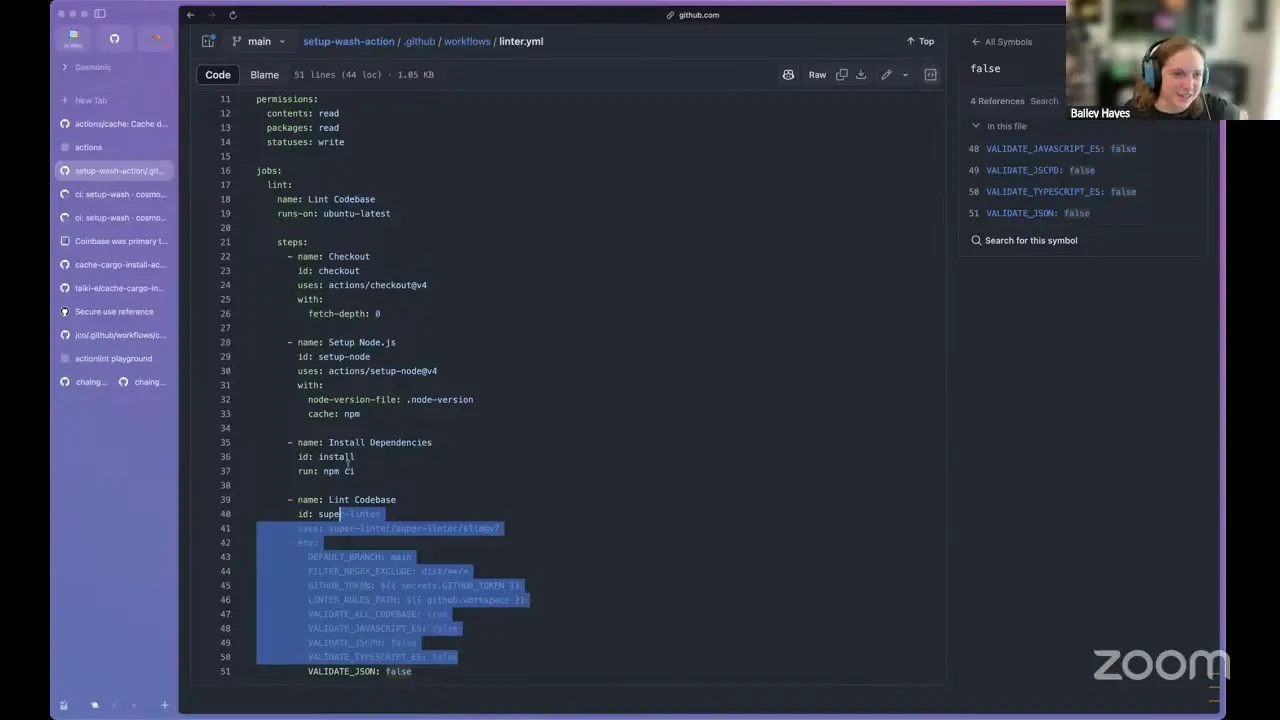
Now let me show you some of the other explorations and things I learned. If you go to the setup-wash-action repo on main, the first thing I did was follow the GitHub documentation, where they strongly recommend a TypeScript-style action. I used their repo template, and it gave me a lot of good things — tons of linting and a build that rolls up your action into a dist folder. One reason a TypeScript action is so recommended is that it has the least startup time compared to the alternatives. If you create your action as a Docker container, you have to spin up that container — that's the slowest option, the least native in the GitHub Actions ecosystem. Part of why the TypeScript version starts so fast is that everything's already running with Node.js there; they just load it with .js and run straight up. So you have to bundle it up, version it, and commit that to main, which is a little weird — as part of your build you have to make sure it's up to date, and the CI they give you checks that the dist folder is current.
There's also a ton of linting that bundles up into a super-linter, and that's where I found a really nice linter that was failing for me. The super-linter made it hard to run locally — I found a way to Docker-run it with the same environment variables — but you can just brew install actionlint and run that directly on your YAMLs. Totally recommend it. They also have a playground, which is good.
Bailey Hayes 13:37
The downside of doing an action this way is that I have a ton of pull requests for bumping dependencies, because it's not just the TypeScript code I'm pulling in inside package.json — it's what came out of the box. I didn't add much, and following their best practices by the book brings in quite a bit, so it has to be revved often. In your workflows you're also depending on other things. Every time you use an action, think of it as third-party code that you're bringing in.
In this scenario, I do trust GitHub's own actions — I'm sure they're auditing them and doing a great job on CI/CD. But there are well-documented cases of why you should be careful about what you put in your CI workflows. There was an example of a supply-chain attack that started with the reviewdog action setup, but the way it actually made it out into the world and caused a targeted attack was through a transitive action that pulled it in and ran it, then exposed the secrets of any workflow it ran inside. So we care not just about the action we provide in our source code, but also any of the actions we bring in — those need to be rock-solid too.
Some basic concerns: I want us to limit these as best we can, and where you can, pin them. So instead of a tag, use the full SHA of that commit. That's documented in GitHub's best practices, so I was a little surprised not to see it in their template out of the box.
There are some pros to the TypeScript route, to be fair. One key reason to do TypeScript instead of Docker or straight YAML with bash is to take advantage of their tool-cache SDK. Their tool cache is different from what I showed before — before I was caching per workflow, here it's per runner. If I run on a different runner that's never run it before, I get a cold start. They also have a bunch of SDKs — one lets you call through the REST API, so you could search the available releases and find the best fit based on the semver someone passed in. Say they wanted 4.0 and we have 4.0.2 — give them the latest patch. Of course, it's REST, so you can do that with any of the options too.
A few shout-outs to other things I found. I geeked out on what Victor created — he was trying to make these in a shared way others could build on. If you want a really nice end-to-end turnkey release pipeline, check out what he's got: a release-PR workflow that can automatically trigger the GitHub releases themselves. There's a lot I want to steal from Victor here. Another thing I thought was inspired was how Chainguard manages their actions — a ton of setup actions that are internal to their project. There's a limitation in the GitHub Marketplace where an action has to be in its own repo to be published, so they had to deprecate and move their CLI action out to its own repo. They ended up doing the composite-action approach — YAML plus shell script. Their number of actions led them to that being the best way to maintain them, so I feel more confident in that approach. They also do composites of composites, which I think we'd be into in the wasmCloud repo — composing together the same setup, test, and environment steps and reusing them.
Brooks Townsend 19:42
Bailey, I probably have a dumb question, but what exactly were the 47,000 lines that were removed? Was it like package-lock.json?
Bailey Hayes 19:52
Yeah. The action itself, which was about five lines in shell script, was something like 300 lines of TypeScript code-ish. But all the dependencies my TypeScript ended up pulling in — like Victor said, there are a lot of dependencies there, and they really filled it in. So having something that just works with the cache is nice, and something our end users don't have to think about for setting up the cache is really nice. I did my best to understand the two caching approaches, and in my experience they were effectively the same, whether I cached via tool actions or via the workflow Actions cache.
Brooks Townsend 20:59
Victor had a question: what about pulling down from GitHub releases, if we have pinned versions, and then calling back to tj-actions cache install action?
Bailey Hayes 21:12
Yeah, I've fussed with all of these. Where I landed is that the GitHub release is what we tag. In my example I was rolling off a revision, because that's what was tagged, but we could set a tag for what we pass into the cargo install, and that feels clean enough to me. I'm okay with an end user setting up CI having an initial cold start — everyone expects that for the first round — and then it installs quickly after. What I expected to see from tj was binstall with cache, but binstall doesn't come with caching, which is annoying. It totally could, and that would give you the best of both worlds.
Victor Adossi 22:16
Sorry, I was muted. Yeah, it definitely doesn't come with caching, but you could probably layer them. If you've got a specific semver — not something like a crazy range — you can try successively slower approaches, and if you dump out to the full build, you might still be able to get faster. Another edge is platform support: I think most of these options will support all the platforms that are possible. And wash is in binstall — Joonas added that — so that's already there. There are a lot of ways to do it, and some are more insecure than others, but this is awesome to see as an option.
Bailey Hayes 22:57
tj did a great job in the install action where it validates all the GitHub Action runners, which is a much smaller set than the actual mix of operating systems and architectures — but it's a good call if someone tried a self-hosted runner on an Android device or something. I think we have to decide how much we care about cold start, and then it'd be worth exploring the layered approach. It also probably wouldn't take much time to just write the shell script that adds it to the Actions cache.
Victor Adossi 24:06
Let me stop you right there. Let's not write shell scripts.
Bailey Hayes 24:13
I went from "I'm going to do the TypeScript thing and follow linting and best practices" to realizing that development environment isn't that nice either. I'm only talking maybe 20 lines of bash. Is 20 lines too long? You like YAML better?
Victor Adossi 24:41
I mean, it's probably fine, not a huge deal. But the longer it gets, the worse it is, and then you wish you had something more powerful. Anyway, having this consistent for everybody is going to be a lot more productive than trying to pull wash from wherever.
Bailey Hayes 25:10
One more thing I forgot to call out: if you look at how tj handles this, he's got a pre.sh shell script that's only for parsing its inputs and re-exporting them. It does some validation — is this available as a stable version — and re-exports all the inputs to the workflow. The reason, which is well documented in the GitHub docs, is that you always want to use an intermediate, because there are plenty of cases where folks target GitHub Actions for injection techniques. This is one where it defended against it because it had an intermediate environment variable. Right now I'm not doing that — I'm counting on tj's install action to do it for us. But if we added more stuff, we'd definitely want that pre-step for all of it. That gets into "too many lines of bash" for me, but if it saves us a security vulnerability it's worth it. So the more we add there, the more those concerns become important.
Brooks Townsend 27:01
Yeah. Bailey, everybody else, please feel free to ask questions. Bailey, the only real question I have — maybe you talked about it at the beginning — is the repository naming structure, which is very particular. Where does it land? Does it go into its own org? Into a wasmcloud/common-actions? Does it sit alongside our monorepo?
Bailey Hayes 27:43
Yeah. I thought through how I want to run this for the Bytecode Alliance org, the wasmCloud org, and also the WASI projects within the WebAssembly org. I evaluated how a lot of different projects do this. If you look at the top 20 actions on the GitHub Marketplace, they don't do what I'm going to recommend — they all say "setup" and then the tool. About 70% do the version as wash-version, because a lot of them have more things that might have a version, so they've landed on that naming for the version parameter. So I'd recommend we prefix the version, or any inputs that might collide.
For the repository name, I recommend doing what Docker does — a -action suffix at the end of the repo name. It does feel a bit like a stutter when you say "the setup-wash-action action," but where I landed is that I'd recommend putting it in the wasmCloud organization, because it's a CNCF org. I was doing it over in Cosmonic Labs because that's our playground, but I'd like it upstreamed into CNCF, managed with open governance, because GitHub Actions tend to be foundational to how people build and consume software. Same with the Bytecode Alliance.
The key reason I don't want a separate "Bytecode Alliance actions" org is that it makes it unclear where the open governance applies. If something weird happened — a maintainer had to step away — who steps in and takes that over? Luckily, we've got a ladder inside CNCF wasmCloud, and the same inside the Bytecode Alliance. So I opted not to set up a separate actions org, even though it's tempting and would be fun to name-squat "WebAssembly actions" — please, nobody steal that. I'd like it to be wasmcloud/actions, with setup-wash-action as a second repository that's git-submoduled into wasmcloud/actions.
Brooks Townsend 30:40
Okay, I don't have any objections. If anybody has objections, speak your mind. Bailey, just let us know if you need permission to create any repos.
Bailey Hayes 30:57
I think instead of transferring this repo — since what gets transferred ends up being this big — I'm just going to start fresh, so you don't deal with any of my history.
Brooks Townsend 31:11
That seems reasonable. Cool. Well, thanks Bailey, good stuff — actions galore.
Next on the docket we have, I guess, a discussion — it's more the musings of a rambling Rust engineer than a demo, because I broke something and can't show you the demo. I'll bring it next week. I wanted to do a discussion around the clap integration I've gotten working for the plugin system. Last week I talked about how you can use plugins in wash to implement top-level subcommands, and how you can use them to implement hooks — register exports for a developer loop so you can implement your own custom interfaces using components, or say "before a component gets pushed to an OCI registry, attach an additional annotation as part of a plugin." The example I shared last week is: before the developer loop starts, run a container on the host system to stand up the observability stack, which I thought was a pretty cool use case.
I wanted to talk through some cleanup I've been doing on wash, preparing it for a big pull request into the wasmCloud organization. As part of wrapping up the plugin implementation, I did some fun things with clap. If you haven't worked in the Rust ecosystem, clap is the de facto command-line argument parser. If I run my wash right now, you'll see a pretty similar list of commands to last week — nothing big has changed on the top-level commands. But now we have something neat.
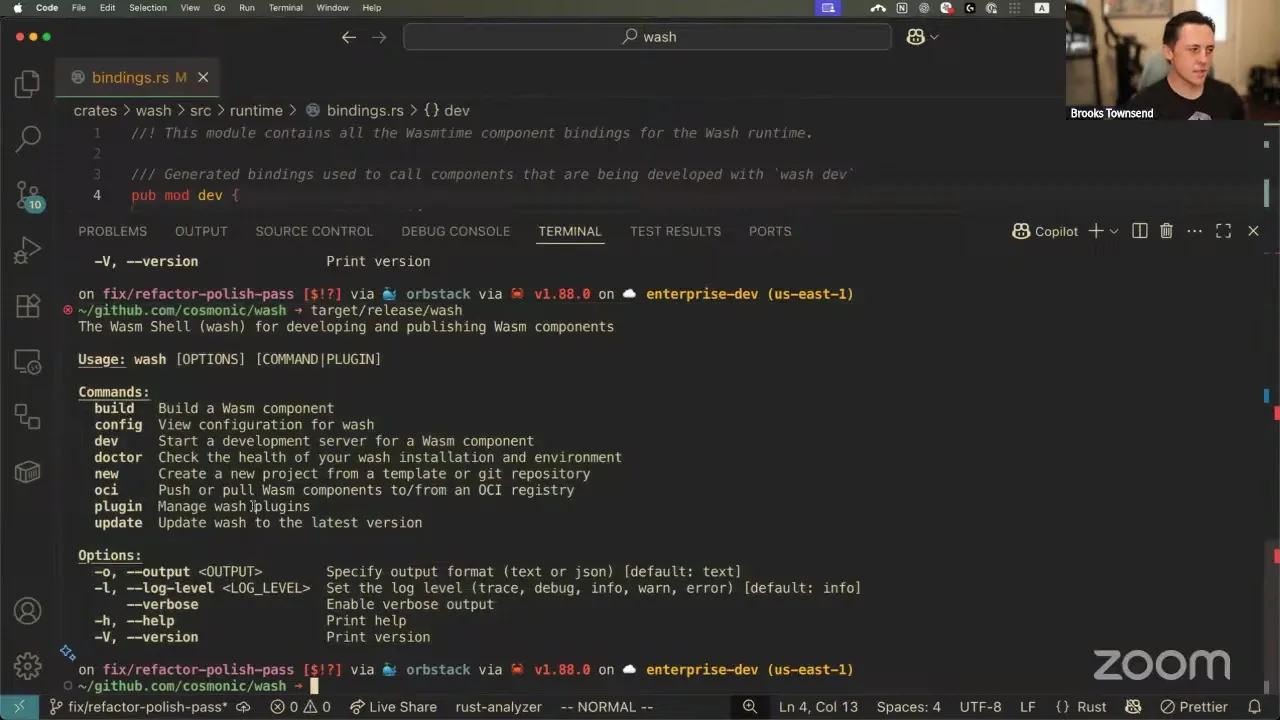
As a reminder, plugins can be installed from local disk or from an OCI reference. Right now I'm pointing locally at a WebAssembly component, but this can be something published — that's how people will probably install plugins. No secrets about what the demo will look like next week, but I have this OAuth plugin that has a subcommand called run, and it runs an OAuth2 server for doing that handshake. So I can see I have that plugin, but I don't really know how to invoke it. If I just run wash, you can see we've done something cool — now there's an extra heading for plugins. This is a little different from how other plugin systems work; we could list these inline just as well, and I'm interested in folks' feedback, but I like the delineation of "here are the plugins you have installed." This isn't something clap supports natively, and that was the fun thing.
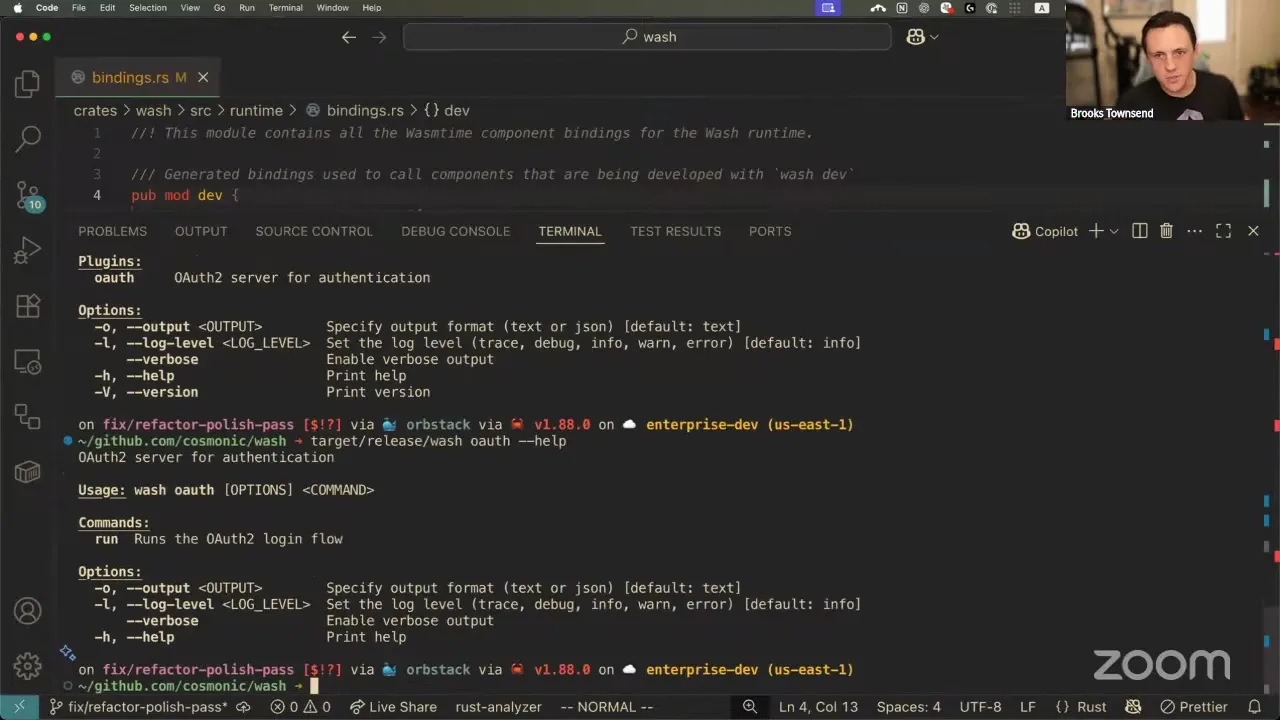
So okay, I installed my OAuth plugin — what do I do? Here's the description, here's how to run it, and it has one subcommand called run. Inside run, same kind of description, plus the actual usage: I can use all the same top-level flags like output, log level, and verbose, but now this command can take a specific port and your own client ID and secret. The cool thing is this hooks into clap's parsing of environment variables, so commands can specify their own environment variables to fill in these values. This is really important for client secrets — we don't want to supply that on the command line, because it'll go in your shell history, and if you're scripting this you could pull it directly from a GitHub secret.
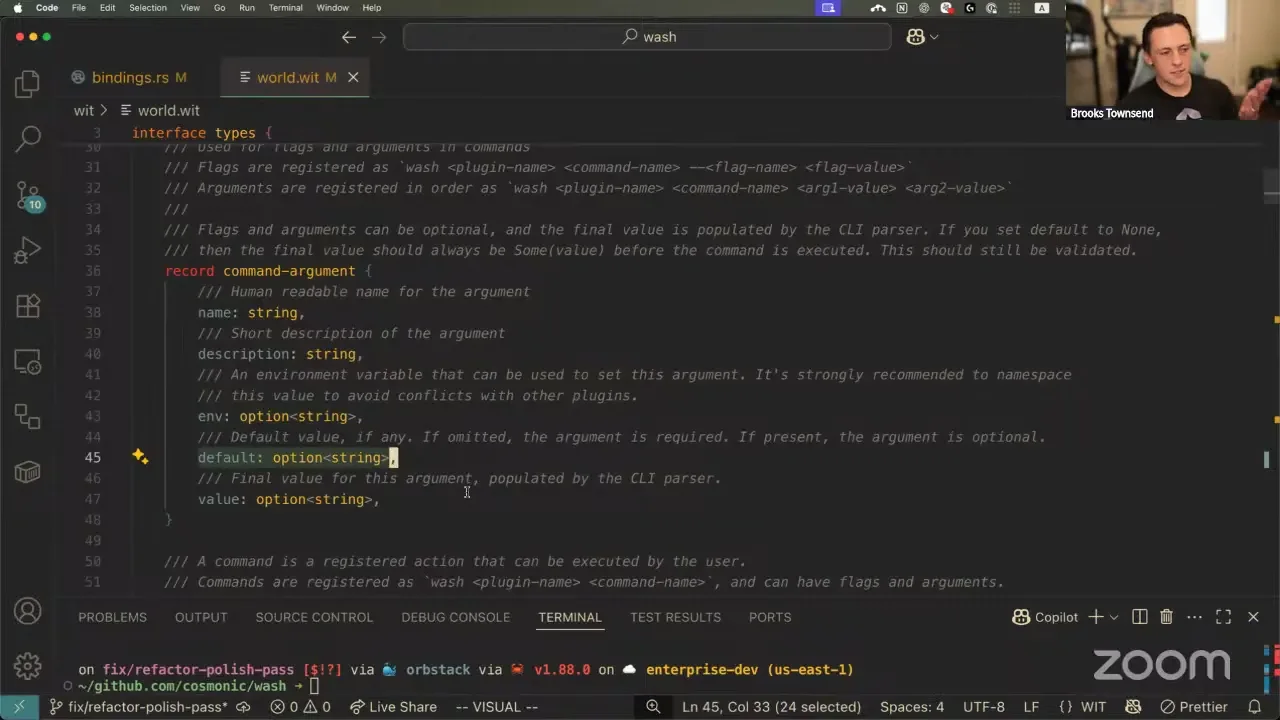
Let me show what this looks like in the WIT first. All your command arguments — positional CLI arguments and flags — can specify a name, a description, an environment variable to use, whether there's a default value (if there is, the argument is optional), and then the final value. The final value has to be optional because you don't supply it; clap replaces it when we run the command. I implemented this OAuth plugin in Go and compiled it with TinyGo. To be a wash plugin, it just has to export the plugin interface, which includes supplying metadata, being initialized, and running a command or using a hook. So if I specify the client ID but not the client secret — these two arguments are required — you get the really nice clap help saying, "hey, you didn't supply this required argument."
Brooks Townsend 40:48
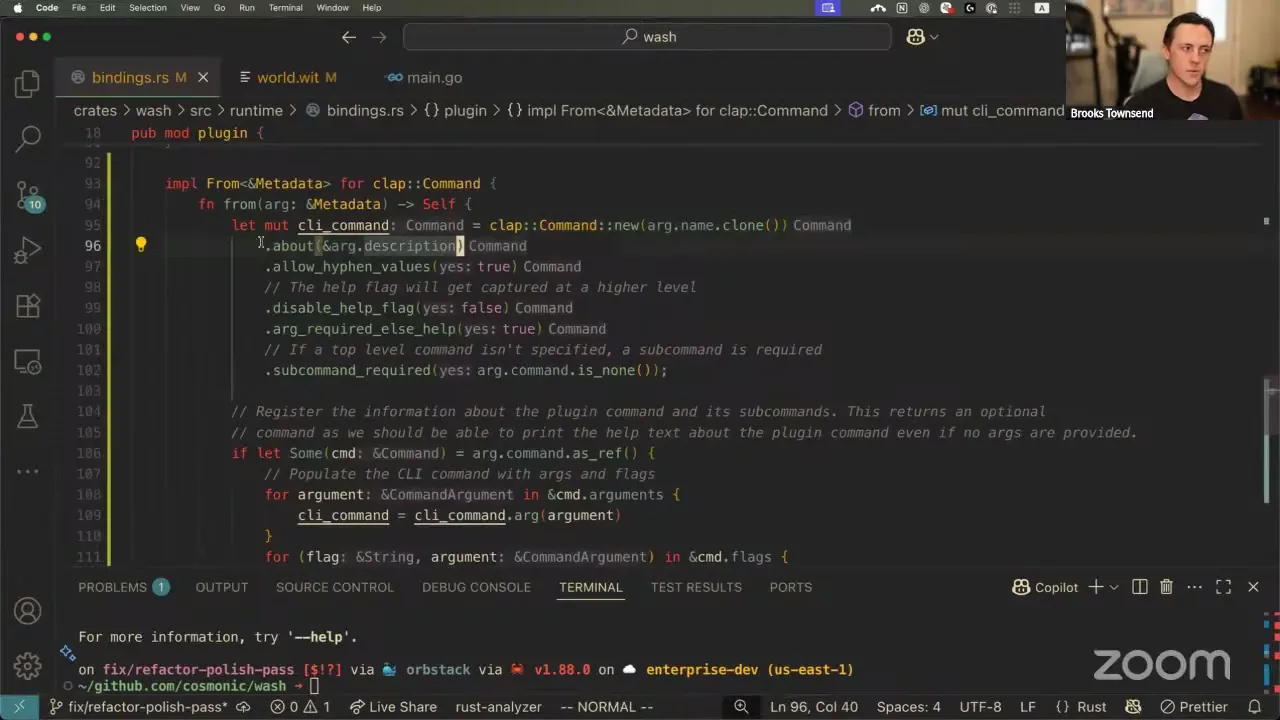
The plugins you have as commands in wash are directly linked into the parsing of the wash main-line flags, and that was actually really nice to set up. In Rust, when you're working with WebAssembly, you generate the Rust bindings for the WebAssembly types — the component types and function signatures. Inside the interface types we have a command structure used to make a CLI command, and an argument record for every argument. So in Rust I can implement the conversion from a WIT command-argument to a clap argument — zoomed in 14 times and it fits all on one screen. We set up a new argument, the help text, whether it's required, and then default values and environment variables. Same kind of thing for clap commands: we add the about text, whether you need a subcommand, and register all the top-level or subcommand arguments.
The way we inject this into the regular command-line parsing uses a mix of clap's derive and command APIs. For every command plugin we have, we register those as subcommands, which is really simple. There's a sneaky little hack that's kind of fun: in clap, all the subcommands go under the same heading. You can rename that heading, but you only get one. The only thing I wanted was, after all these commands, to display the installed plugins. So I register a fake ghost command with clap whose command name is a newline and an underlined "plugins," and the about text is also a newline. That fills in this fake command, which I think looks kind of nice. I'm not so proud of the hack that I don't want to take it out if people don't like the separation, but I thought it was neat — I found forum posts from years ago about how to do this in clap, and there wasn't really a way.
So that's really all just to say the command-line experience for plugins is coming along nicely. It's integrated well into the natural CLI feel of wash, and commands can specify their own arguments, flags, and subcommands. The only requirement for a component to be registered as a command, or to participate in the wash plugin system, is to export this wasmcloud:wash/plugin interface, which is going through a lot of iterations right now. Once we settle on a nice API I'll put it up for a proposal, lock it in at like 0.1.0, and handle backwards-compatible changes. Plugins have access to WASI 0.2 — WASI HTTP, WASI config runtime, and WASI logging. Next week I should have a cooler example of the plugin, and I'll do this in TypeScript too to round it out. Hopefully this is informative for folks looking for a tiny Go example.
Bailey Hayes 47:48
A question from chat: for plugins that are hooks off of commands, would they appear in the plugins list, or only when you get the help text of the command — like wash build --help?
Brooks Townsend 47:48
Good question. Right now they do appear in the plugin list if you list them. Let me show — if you do wash plugin install, it'll show the hook types, like when it participates in the wash lifecycle, in the plugin list, instead of showing the subcommand. Right now it doesn't show in the clap help text of the command. That would be a really interesting experience to have — like "before Aspire/OTel runs, run the OTel dashboard." Is that the kind of thing you're thinking of? That'd be kind of cool.
Bailey Hayes 48:38
Yeah, that's sort of what I was wondering. I'd also want it to be consistent. There might be a world — I might be making things up — where you could have before-hooks that are part of wash that aren't plugins. I don't think we'd ever do that, so anytime you see "before" and "after" you probably know it's a plugin. But I like highlighting that it's a plugin as something to be aware of.
Brooks Townsend 48:38
This would be really nice to show. One thing I haven't brainstormed is ordering of hooks — ideally you could dictate the order in which they run. Right now it's the order you installed them, or name order. This would be a cool way to be clear about when things run and at what time.
Bailey Hayes 49:19
Yeah. Cargo doesn't have a very good plugin story — most people ended up wrapping it with a meta-command like cargo component, and that had its own problems. What I'm thinking about: I want to know what's a plugin, where I got it from, and whether it's a before or after when I'm looking at wash build. I want to see what's going to show up and what's available to me, because maybe you'd disable some of those in the wash configuration directory for that specific project too.
Brooks Townsend 50:35
Yeah, all kinds of things like this are so specific to a plugin use case. I hope we have enough configurability to let you do that, but if not, I know there's going to be a ton of feature requests and fun things to work on here too.
Massoud had a really good question: how can users trust a plugin they pull in? I think it's two-fold. One thing you can certainly use to help facilitate this is the ability to inspect a component. This works with OCI references too — you can inspect it to see exactly what capabilities it plans to use at runtime. This doesn't necessarily lead to trust or not, but if you look and see that it's going to make outgoing HTTP requests and spin up an HTTP handler, you might think, "hmm, why is it making outbound HTTP requests? This is just an emoji-generator plugin." Those clues can help.

The good thing is that we execute all these plugins within the bounds of the Wasm sandbox. When you pull it down to install, you know it's a valid WebAssembly component — that's the only context it can execute in. Each plugin gets its own WASI context and its own directory it has write permissions in, but it doesn't have access to your whole file system. That's to let plugins write files for later reference or cache expensive operations, but it's in its own little place, so it can't read your /etc/passwd or whatever. I think really leaning into the permissions model of a WebAssembly component is the best way for us to make sure it can be trusted.
Secondary to that, there's a plugin test command I've been working on. You can use it to check the metadata — see what a plugin plans to do before you install it — its capabilities, when it's going to run. The WIT also specifies who you can contact about the plugin, where to find the source code, and the license, so you could track the plugin back to its source. And there are other things we could do around cosign and using existing OCI tooling to make sure you're getting a trusted thing.
Bailey Hayes 55:06
I think there's so much more to add, Brooks. Talking about what pre-opens a component is allowed to have is pretty critical here — what files and directories it's allowed to access. We could do capability-driven security just on that aspect alone. With an OAuth secret written to disk, I'd only want that plugin to read from that, and I need an auditability trail for anything else that might mess with it. So locking down and having a really good write-up on how our pre-opens work — plugins not being able to read or write to other plugins' directories — is important. Environment variables created by one plugin: I'd want provenance, so you know "this CLI environment came from this plugin," versus globally passing the whole set around all the time. Being specific about which environment keys are passed in is another key.
I really like how krew, the kubectl plugin manager, has done this. I posted a link to examples of CVEs floating about in existing plugins — luckily they didn't find any criticals or highs. But like anything, you're pulling it down and letting it write to disk, so it's not exactly sandboxed in that world. The way they manage it is many-fold: OCI signing is a great way to do it, and having a place — effectively a marketplace — where we can show it's been audited, who it's by, and which organization, is another key. Just like I generally trust GitHub Actions coming from the Actions org, and I'd feel great about wasmCloud actions, the community-contributed ones in contrib are maybe a bit more wild-west. So showing what org they came from and where they're maintained is important too.
ossfellow 57:47
I have to drop for a meeting, but I just wanted to say: the combination you described is great, but especially considering plugins will be using the whole environment — including enterprise environments — one approach would be that those permissions could live on the wash side, so you can blanket-say that, for example, pre-opens are not allowed in this environment, no access to disk. Instead of looking one by one at what the plugin configures, that gives people confidence to say, depending on their environment — my dev environment, my personal environment, the regulations they have — the level of comfort. Of course, supply chain, cosign, all those things tie into this. But the end result is: do we trust that plugin to, for example, manage your secrets?
Brooks Townsend 59:06
Yeah, I love that idea. It matches up with WASI really well — you should be able to use wash configuration to blanket allow or disallow certain APIs from reaching plugin components, or allow them in a specific context. In an enterprise, just say all the plugins get no outbound HTTP, no file system access, no environment parsing. That's really great feedback. I took down that note, and I'll make sure to keep it — when we contribute this, here are the security boundaries. Maybe it won't be in the first iteration, but a follow-up makes a ton of sense.
Brooks Townsend 1:00:12
All right, y'all, I think it's about time. Thank you everybody for coming and hearing about GitHub Actions and command-line parsing — very exciting stuff, it actually is exciting, come on. Great to see everybody's face. We'll see you next week for another fun wasmCloud Wednesday. Have a great week, everybody.