Transcript: wash: The Wasm Shell — a Plugin-Driven Wasm Component CLI
wasmCloud Weekly Community Call — Wed, Jul 16, 2025 · 61 minutes
Transcript
Brooks Townsend 03:54
All righty, hey everybody. Welcome to wasmCloud Wednesday, for Wednesday, July 16. It was a pretty fun last week after the roadmap session. I'm going to share the agenda in just a second, but we actually have someone who's definitely not new to the community or to us, but maybe doing the community call for the first time. Jeremy, would you like to introduce yourself — how you came to the Wasm land, and anything else?
Jeremy Fleitz 04:30
Yeah, absolutely. I've been on a few other community calls, especially a long time ago. I was at Capital One for about six or seven years, then I switched over to another startup, mainly in the cybersecurity space, but I wanted to come over to Cosmonic to really focus on WebAssembly. With my passion around containerized applications, WebAssembly really seems like the obvious next step for being able to run applications more securely and more efficiently — especially when it comes to PCI and PHI types of data. So that's why I'm now really focused on WebAssembly and on the wasmCloud meeting too.
Brooks Townsend 05:22
Nice, awesome. Thanks Jeremy for doing the intro. All right, well, welcome Jeremy. I think we can go ahead and get started on the agenda. Today will be a pretty fun one. We've got a demo, a discussion, an issue of the week, and a documentation page of the week — lots of fun stuff.
And you may be asking yourself, what is this demo about, introducing wash? Don't we already have a wash? Well, we do, but let me tell you — this has been something I've been working on over the past couple of weeks. If you click on the link in the agenda, you can see the repository where we're doing this work. I've actually been working out of the Cosmonic Labs organization. It's where Cosmonic does a bunch of our experiments. This is kind of a temporary move, but I wanted to talk about this project, which is called wash — but it's more focused on being a lean, mean WebAssembly component development machine.
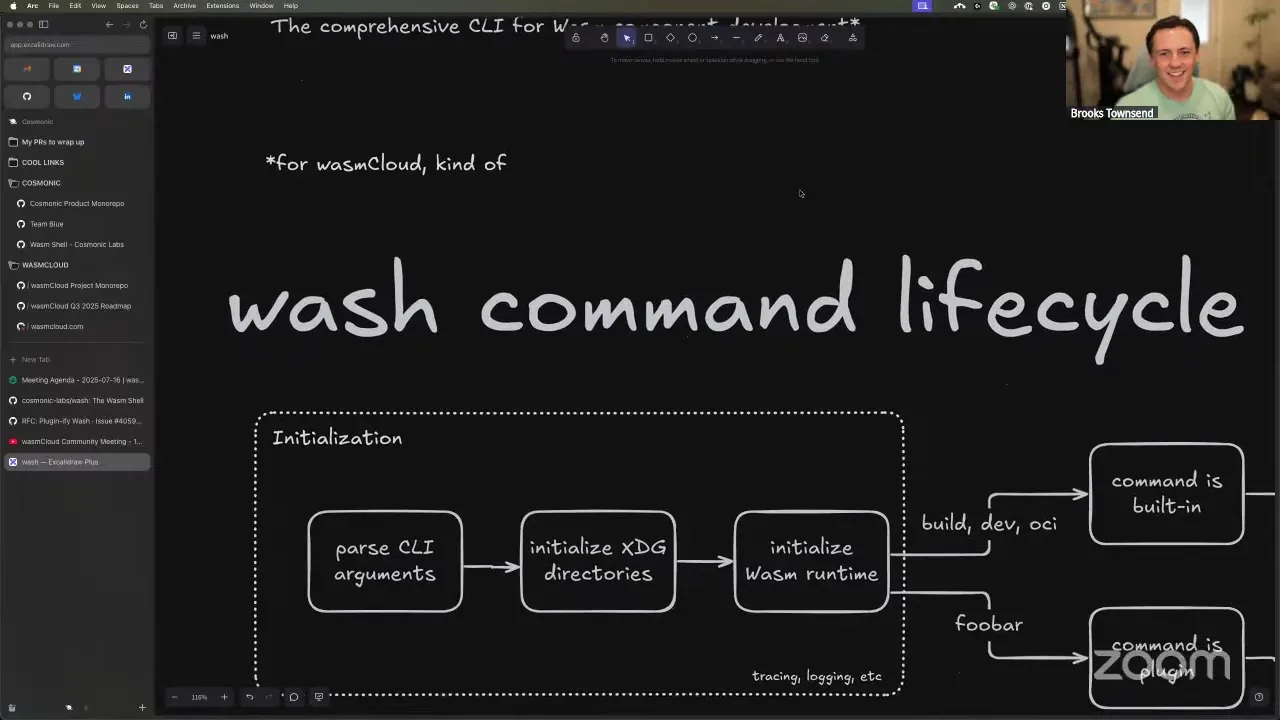
So instead of wash as it is today — where it's a bundle of command-line tools for wasmCloud development — I want to take this RFC, which Taylor worked on a while ago, around plugin-ifying wash, and take it to the next level. The core of wash is just for Wasm component building, developing, and pushing to OCI according to the standard specs. Then we can have wasmCloud-specific functionality as plugins to this wash plugin CLI model.
We work with this amazing plugin-model technology of WebAssembly components all the time, and it feels silly not to take full advantage of that — especially with our level of expertise working with components as an application platform. So we want our Wasm shell to be something that's really good at developing components. The key workflows of wash today reflect that: utilities like build, which can detect the language of a component project and build it; dev, the dev loop that automatically interprets the dependencies of a component to run it; and OCI pushing, to get it up into a package repository. Those key flows are still central to component development. But there are also a lot of things wash does that aren't quite core to that mission.
When I started working on wasmCloud about five years ago, wash was the first thing I worked on. I'd like to think I've gotten better at writing Rust since then. Over the years it's gone through refactors and become a bit of a beast. So thinking about wash from the ground up — with the right level of abstraction and the right goals of being a lean, great CLI for component development — and then, as a side goal, making it not wasmCloud-specific.
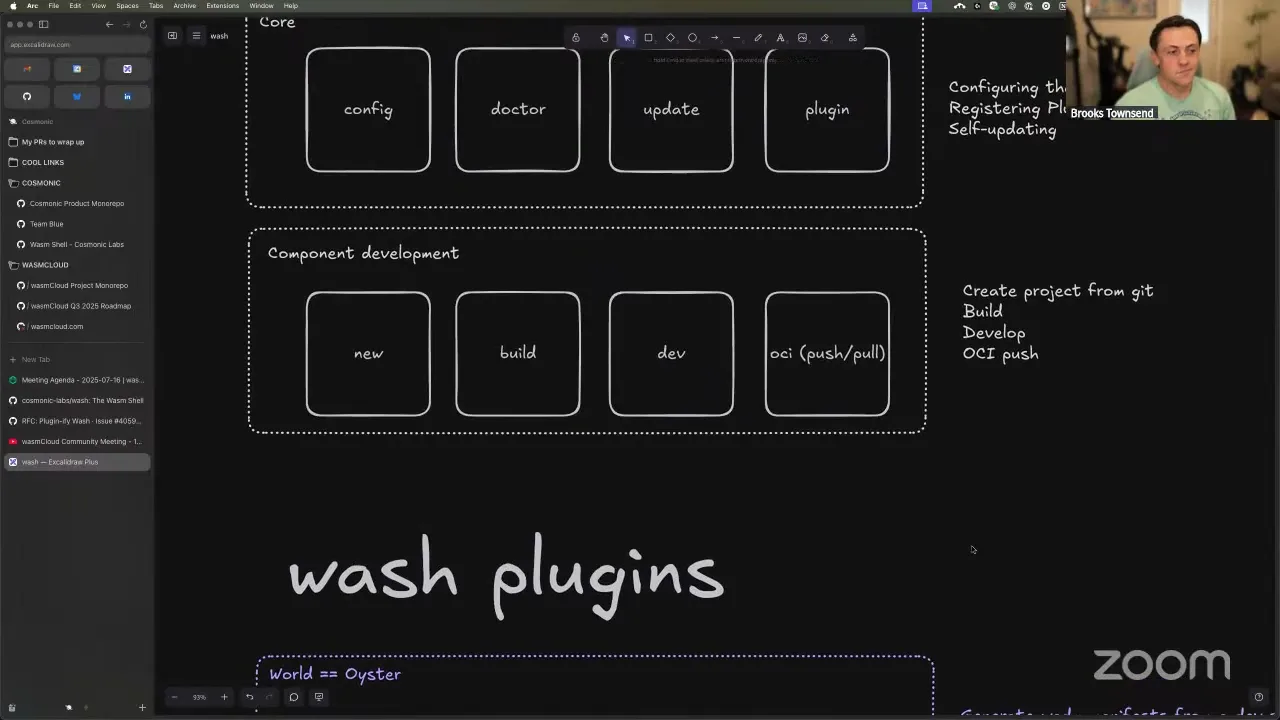
I have diagrams — diagrams are good. This is the lifecycle of an individual command in wash. There's the initialization step: you run a command, we parse the arguments, and we initialize the directories we need to work with. This actually took a lot of inspiration from the community member who contributed the XDG spec to wash — thank you so much. We initialize the data, config, and cache directories, and then we initialize a WebAssembly runtime. This uses the wasmCloud runtime under the hood, which is basically just wrapping Wasmtime with a light abstraction. If it's one of the core built-in commands, like wash build, wash dev, or wash push, we go down one execution path; if it's a plugin component, we go down the other.
Brooks Townsend 10:00
Let's talk about the top path first — the execution of a CLI command. Commands now have a concept of hooks, which are plugins you can execute before and after a command occurs. This lets you do really interesting things: before a build, maybe you write out a piece of metadata to the component project; after a dev loop, maybe you generate a wadm manifest so you can run that in production. This allows the core of the wash CLI to be hooked into — you can add custom functionality there. You can also register top-level commands, just like the current wash plugin structure: if I run wash foobar, I go find the wash foobar plugin, execute it, and do all the argument parsing.
So at the core, the wash command lifecycle isn't too different from what it is now. But everything here in purple is a WebAssembly component, and it takes a more comprehensive approach of making plugins a first-class citizen instead of an extra step.
Brooks Townsend 13:51
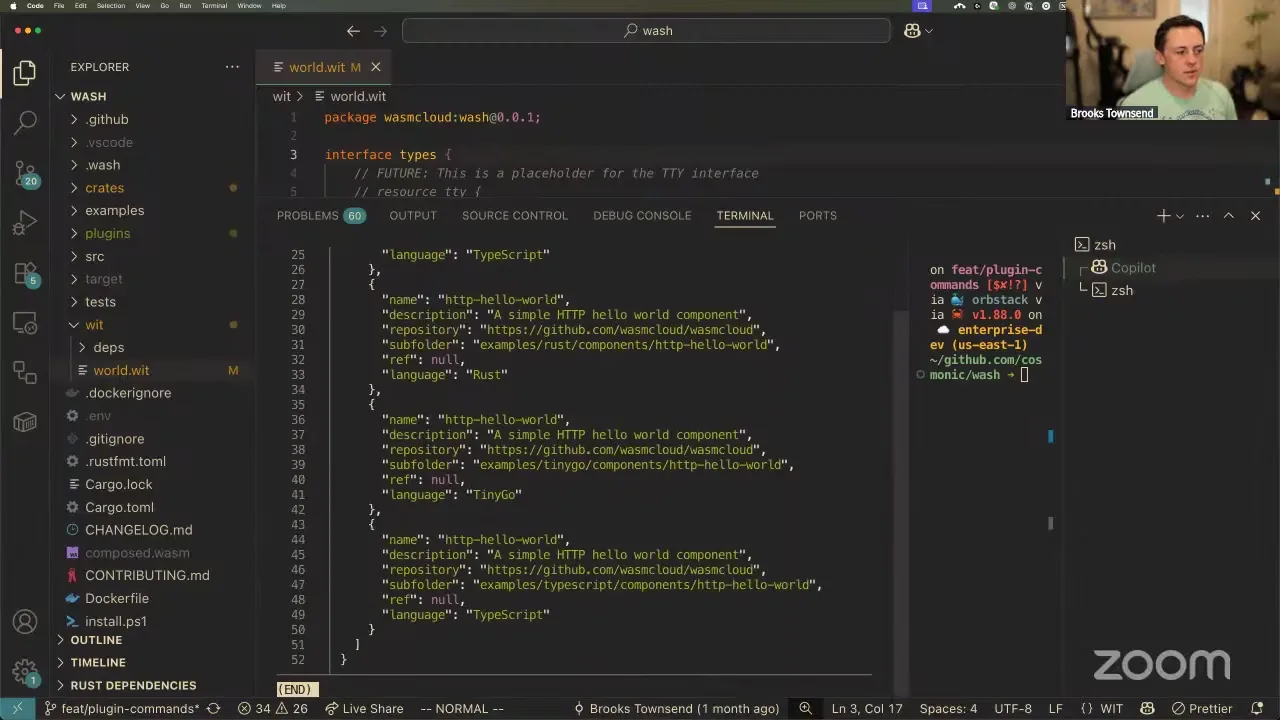
Currently there are only eight commands in total, which is a lot less than the current Wasm shell. There's config, doctor, update, and plugin — managing your configuration, a sanity check to make sure you have tools installed, auto-updating the CLI from GitHub, and plugin management. Then the core of component development, which is the most powerful part: the ability to create a project from a Git repo, compile that code into a WebAssembly component, run a developer loop so you can quickly iterate, and then push your finished component up to an OCI registry. That's often where the end state is — you push it to a registry, and then you run it on an edge device or in the cloud, pulling it down from that registry. At that point wash is outside the lifecycle.
Everything else is a plugin. Anything that's not part of the core experience — like generating a wadm manifest for a component — is, I'm proposing, a plugin. That's a great plugin to run after your dev loop or after your build. If you take a look, this really simplifies the surface of the CLI. Its core mission is to be a utility for developing Wasm components: locally you can create templates, build them, do your dev loop, and then push your finished component to an OCI registry. Other than using the wasmCloud runtime crate underneath, and the fact that the WIT interface for the plugin is called wasmcloud:wash, there's actually nothing wasmCloud-specific in the Wasm shell. So there's really no need to constrain it to wasmCloud development — under the hood we're using all the standard tools and interfaces. Does anybody have questions about this proposal before I step into a demo?
Brooks Townsend 15:50
I figured the demo is the cool part. Everything here will look pretty similar to what you're used to, and that's on purpose. Many of the core commands are already present in wash now and work similarly to the way you expect, but there are a couple of key differences — some are breaking changes, some aren't — that make it really nice to use in a way that many other CLI tools work.
If you read the README for the Wasm shell right now, all we have is a curl-into-bash or PowerShell install script. Very simple — I'm lazy, I'm not trying to mess with Homebrew right now, but I will eventually. The single-command install on Linux, Mac, and Windows feels like the baseline. Once you have it installed, you can run wash update to download the latest version. I'm working off a dev branch, so I'll use cargo run for the rest of these.
There are a couple of new top-level commands. There's a config command — not for component configuration, but for where the configuration lives locally on your machine. We use the XDG spec directory, so you can check where your data, cache, and config are. Configuration lives at a global level, but then locally inside a project there's a config.json that overrides the global config, and command-line arguments override that. So there's a level of precedence: more and more specific configuration. It may look weird to see config.json when we normally use wasmcloud.toml. I don't have a strict preference on the config structure — YAML, TOML, JSON — honestly that feels like a bikeshed. Maybe we just add support for all of them. I went with JSON because it's super easy and serde has great support.
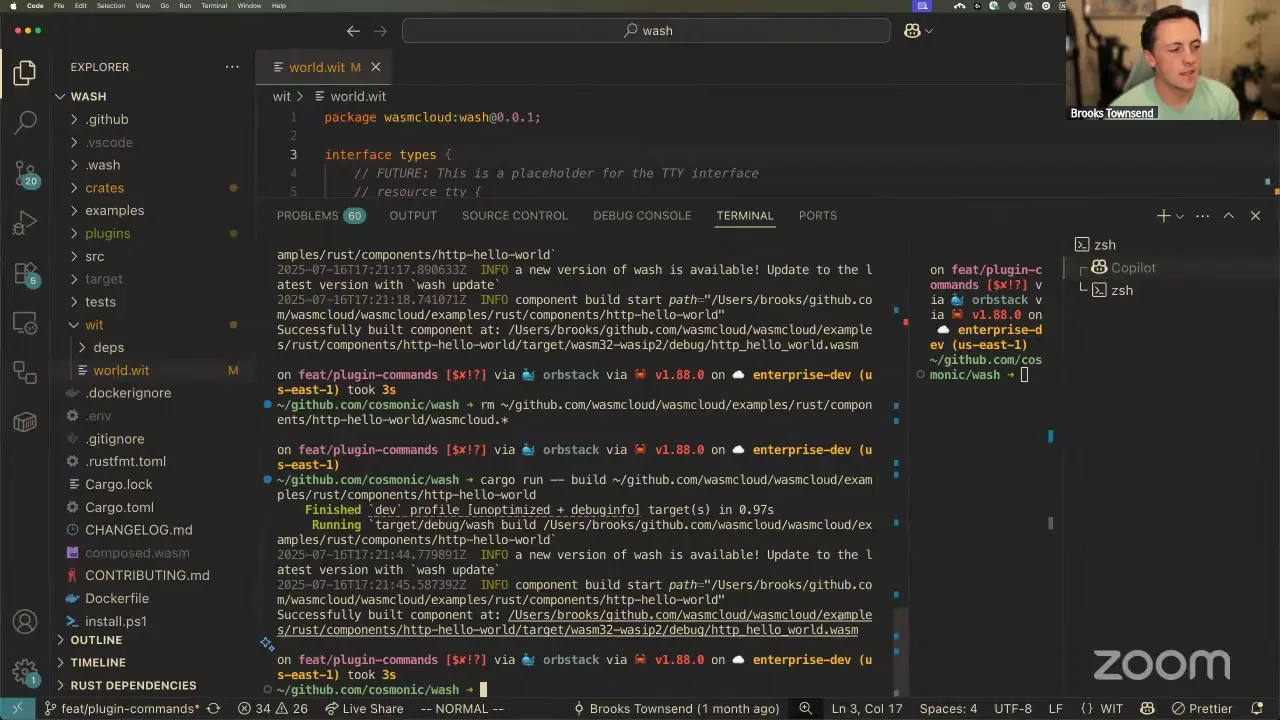
doctor is one of my favorite inclusions. It's essentially a sanity check for your configuration and for what kind of project you're developing. As you can see, wash doctor detected that wash is a Rust project. If we were building a component, it would check that you have cargo and the wasm32-wasip2 target. It does the same in a TypeScript project — checking for Node and npm — or a Go project, checking for TinyGo and wasm-tools. These are the preflight checks for whether a build is going to succeed at all.
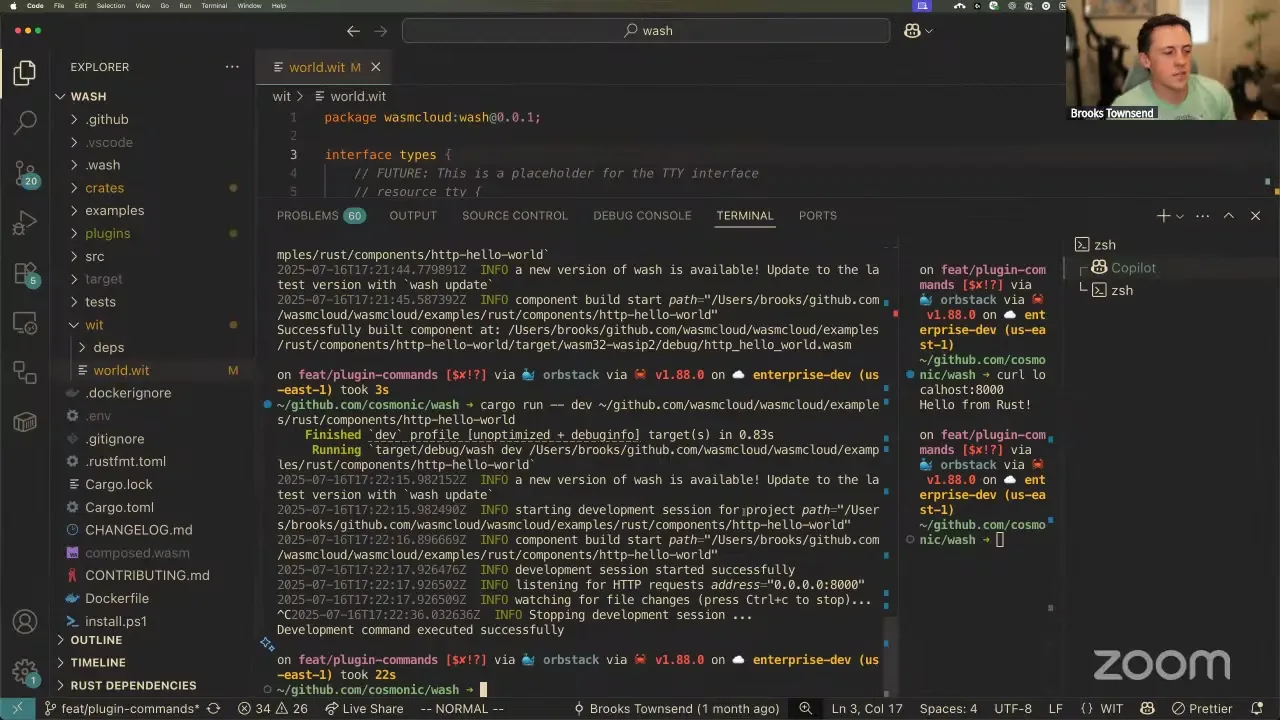
Now the core development loop. If we want to build a component, let's go to the wasmCloud monorepo and build the HTTP hello-world component. This looks really similar to what you're used to, but it's a little simpler — you just do wash build and provide the path. You don't have to do -p; it's the easiest possible thing to get started. What's neat is this doesn't actually require a wasmcloud.toml. wash works entirely by introspecting the project: it sees there's a Cargo.toml at the root, so it knows this is a Rust project and builds it like one. That's really cool, because you could take the Bytecode Alliance example components and build them with wash, whereas before you'd need to scaffold a wasmcloud.toml.
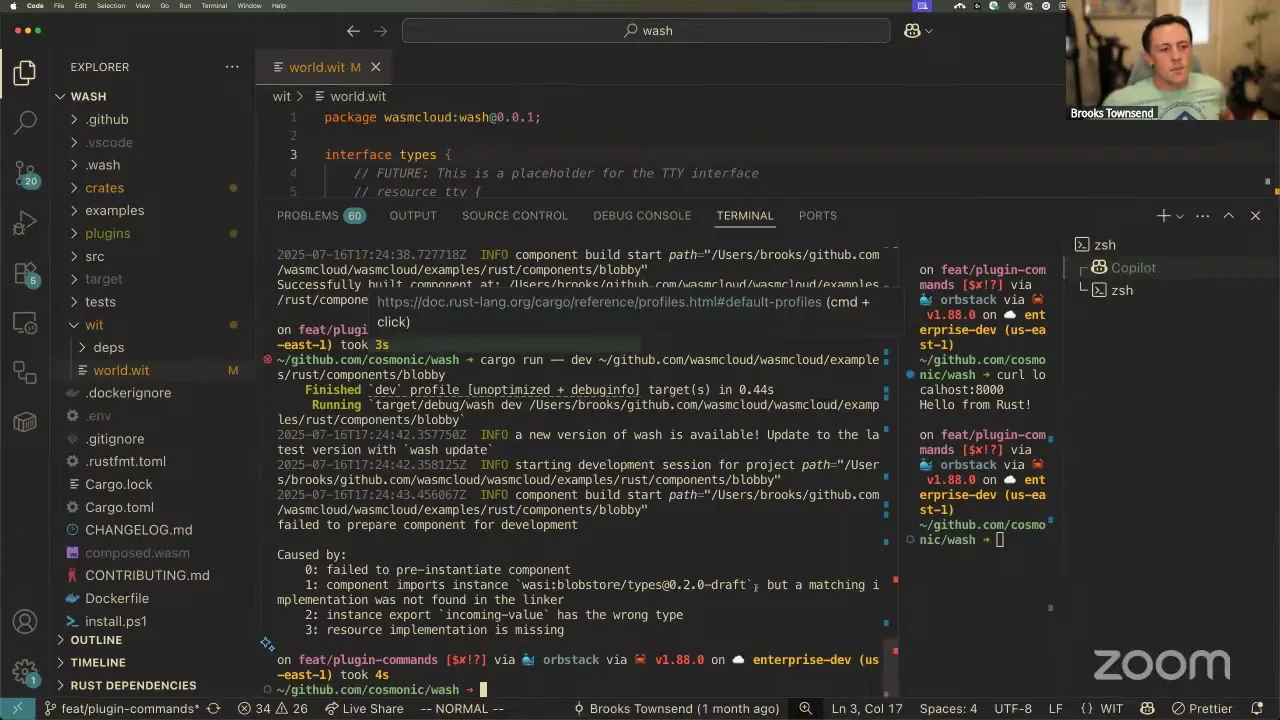
Past build, we can also do the dev loop — same structure as build. You point it at a local project, it builds the component, and then launches an HTTP server that listens for requests. So I can call localhost:8000 and see "hello from rust." This HTTP server is actually not an HTTP server provider — it's a hyper HTTP server spun up in memory in Rust, and we're taking those requests directly and calling the HTTP export on the component. dev is not launching wasmCloud; it's running the wasmCloud runtime. Because it's working at a level lower than our host, we don't need to run NATS, we don't need to run wadm — we can inspect the component itself and know exactly what it needs to run. If we don't know about something, we just bail. It's all ephemeral; there are no providers being downloaded, nothing executing in the background, but it's all working using WASI HTTP and the implementations we expect. You can think of this dev as very similar to wasmtime serve.
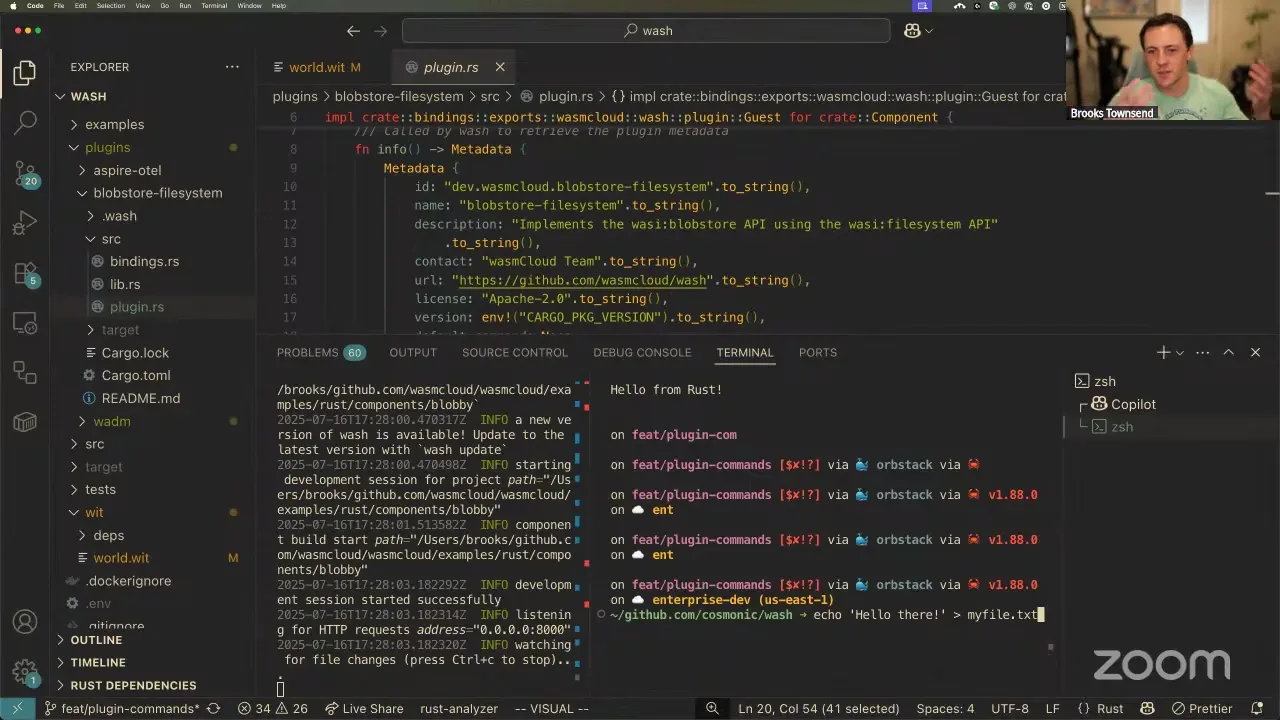
That works with HTTP. But what happens if we try to develop a component like blobby? Blobby uses WASI HTTP and wasi:blobstore to store objects in a blob store — that could be S3, a file system, whatever. If we just build the blobby project, it works fine. But if we try to develop it, we get an error: we don't know about that import. This comes from something we talked about in the wasmCloud roadmap session — adding support for many interfaces in our core leaves us more responsible for maintaining them. wasi:blobstore is a draft interface right now. There's nothing wrong with that; we have it built into wasmCloud. But if there were a breaking change, wasmCloud would be responsible for revving it, supporting both, and releasing a new version. So wouldn't it be cool if you could use a plugin to implement this interface — not a provider plugin, a component plugin?
Brooks Townsend 25:30
I have an example plugin called blobstore-filesystem. Its WIT world is pretty simple: it exports wasi:blobstore and implements the interface using wasi:filesystem. WASI filesystem is part of WASI 0.2 and is supported well across language toolchains, so we can have a component that implements the entire blob-store interface backed by a file system. This is probably a blog post on its own.
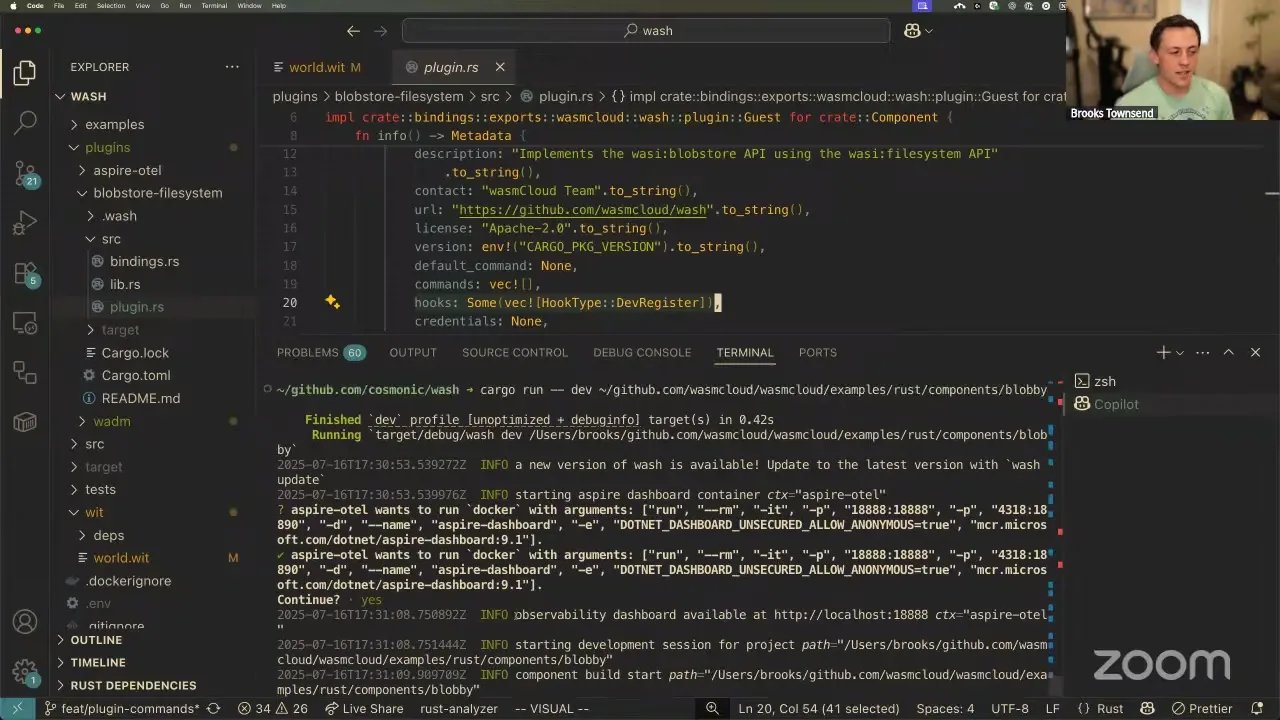
The only special thing that makes this component usable in wash is the export of the wash plugin interface. This is what we look for in all our plugins. It has some metadata about what it is, but it also has a specific hook called dev-register, which registers the component as something that implements interfaces for your development sessions.
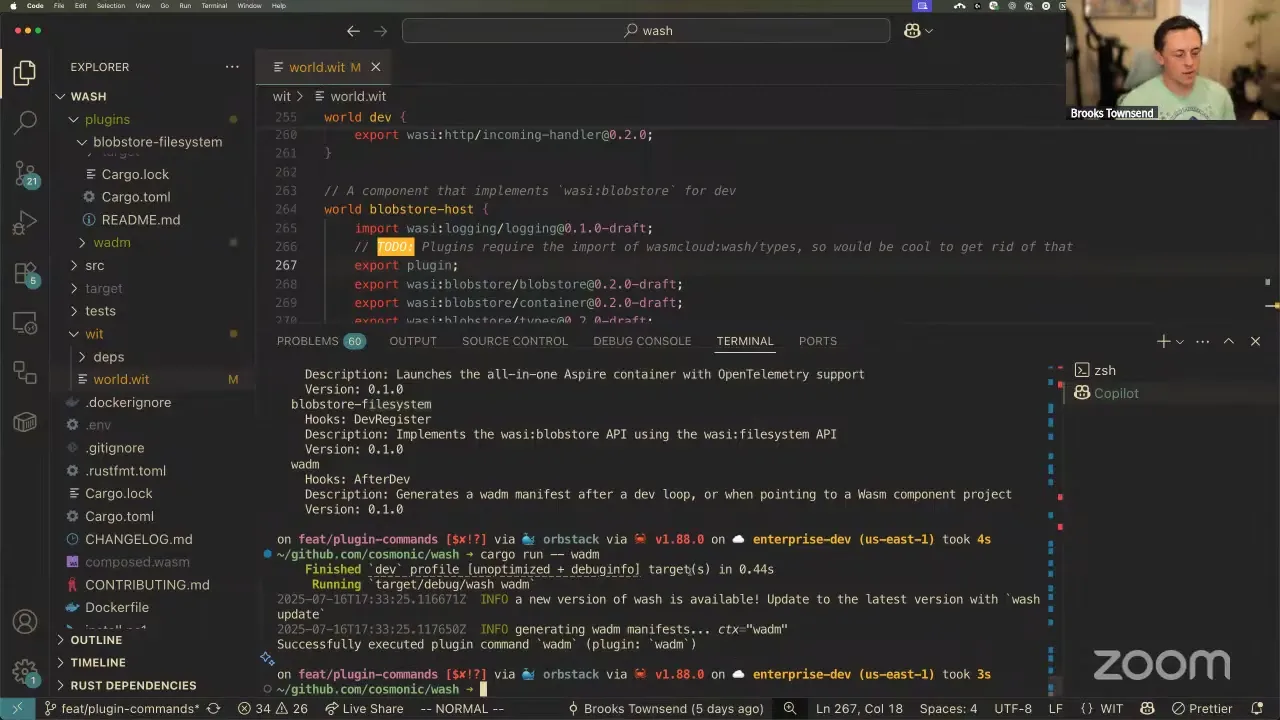
So if I install the plugin — I'll do wash plugin install straight from the component on disk — then wash plugin list shows I have the blobstore-filesystem plugin installed. All that really means is wash took that component and stuck it in the data directory.
What's cool now is, if I do a dev on blobby — the thing that didn't work before because we didn't know about wasi:blobstore — we get the HTTP server. Then I can follow the steps from the blobby README: create my-file.txt, upload that file to the blob store, and download the contents back. Blobby works as expected, all facilitated by this component that implements the interface you need. So we could create component plugins for wasi:keyvalue, wasi:config — and for completely custom interfaces. If your dev loop needs something that implements my-org:foobar, you can create a plugin that implements it, and your dev loop will always call your plugin.
You can also do more traditional hook plugins. I have another plugin called aspire-otel. This component has a hook for before development and after development: it stands up an Aspire observability dashboard for the dev session and tears it down when you're done. So if I run the same dev command, before the session starts we get a confirmation — "this plugin wants to run a native local command on your system, Docker, with these arguments." These are just the all-in-one Aspire dashboard things. Then I get a log: "observability dashboard is available," and there's my dashboard, running in Docker. When I finish my dev loop and hit Ctrl-C, the component runs its after-hook and stops the Aspire dashboard. It's stupidly easy to make a plugin like this work: you have metadata, you register for a specific hook or top-level command, and you call this WIT interface to have the host execute a function. Of course, we confirm things like that — we want to be explicit when something tries to get around the component security boundary.
The last one — which is aspirational and doesn't really do anything yet — is a wadm plugin. This plugin has two things: it's a hook that runs after development, and it registers itself as a top-level command. So this component can execute as a hook, but it can also execute as a top-level subcommand in wash. Now I can run wash wadm — it just logs that it's going to generate wadm manifests, but where previously that wouldn't be valid, now it actually executes.
So there are two types of plugins: a CLI command, or a hook into an existing command to execute before or after it runs. All of them must be WASI P2 components, and all of them must export the wasmcloud:wash plugin interface. That's how we know what a plugin is and when it needs to run.
Thanks for letting me do a 25-minute demo and spiel. wash is something very near and dear to my heart — I've been working on it a long time, and what I really want it to be is a great command-line tool for developing WebAssembly components. There are so many commands in wash today that could just be components implemented with the plugin model, and so many opportunities for people to hook into wash to do custom things like that Aspire dashboard — somebody could do that in 10 minutes with their own Grafana or whatever. It's a neat way to think about a command-line tool and to lean into components for component development. I see some questions.
Taylor Thomas 35:09
How does this handle multiple plugins that implement the same interface? Will wash catch that for you when you try to install?
Brooks Townsend 35:12
It doesn't right now — you can't do that. If you have two components that implement wasi:blobstore, you'd have to pick one to install. I'm just trying to keep it simple before we overcomplicate things. It'll catch it, but I'm pretty sure we currently catch it at dev time; it'd be better to at least give a warning if you install a plugin of this dev-register type.
Taylor Thomas 35:38
In an ideal future — don't consider this now — you could just prompt and say, "there are two implementations, which one do you want to use," and use that. Anyway, it's really cool. I was mostly the plant in the room, because I figured that was handled. For those new to the call, this normally happens with us — we ask the plant in the room questions. Brooks showed me this code a little while ago, so I've been super excited.
Brooks Townsend 36:09
Yeah, for right now, just keeping it simple — only one — but I think a great feature would be a pick prompt, and that would be trivial to do. ossfellow, you asked: plugins don't have to be hooks, but hooks must be plugins. That's right. The different plugins can either be a command — a top-level subcommand — or a hook executed before or after a built-in. Feasibly you could also have hooks for plugins, but I'm leaving that as a future exercise before we overcomplicate things.
You also asked whether people can develop plugins in other languages too — 100%. Anything that can compile to a WebAssembly component and export the wasmcloud:wash interface can be a wash plugin. I'll probably convert one or two of them; the blobstore-filesystem one is more complex because you're exporting resources, but things like the Aspire and wadm plugins might be better in Go.
And from the stream — thank you. It sounds like you've ejected the wash CLI from Docker and NATS and are running it as, in effect, a generic Wasm component compiler and server on the localhost network. The JavaScript frameworks use this approach and, you'd argue, are the cutting edge in development environments. I took heavy inspiration from the command-line interface guidelines at clig.dev — it has a lot of cool philosophies, highly recommend a read. What I see as really successful CLIs for development are things like npm: npm start, boom, here's your thing, and it just reloads. I'm trying to make wash reflective of command-line interfaces you'd expect from Kubernetes, Docker Compose, or kubectl. I've tried to eject everything that isn't core to the component development experience and build up from a generic CLI dev tool, so we don't have to bring in all the wasmCloud complexities when you're just doing development — but we can bring them in at the right time, like when you run on a server that's not your localhost. There's an assertion here that wash is not a production tool. It's only for development. While there may be plugins that let you interface with production things, those should be considered at your own risk.
Taylor Thomas 41:25
This is something I'm super excited about, and I'm curious whether people have contrary opinions. When Brooks, Victor, and I have tried in the past to detangle the dev thing from the operational tool, it's really hard. This is what we've been going for, because an operational tool can be a plugin, and that plugin can have whatever config formats it wants. But that leads me to my original question, related to what ossfellow asked: you said it got rid of wasmcloud.toml. In general I'm in favor of that, but there are still useful configuration things — like where it can fetch stuff from. What's the plan to handle those going forward?
Brooks Townsend 42:16
I don't reference wasmcloud.toml in wash now, because I wanted to work on this system of a global config with reasonable defaults, an optional local project config that doesn't need to be at the top-level directory, and command-line flag overrides. I don't have a super strong preference on whether configuration stays as wasmcloud.toml or becomes a wash config.json; I just want it to be consistent. But to your question, there are still a lot of valuable pieces of information in a wasmcloud.toml — like the extended overrides and dev configuration — that I think we should preserve in this version of wash. I do automatically handle the wac/WIT fetching: if you have a wac.lock or wasmcloud.lock, we'll interpret that. I don't have the extended overrides yet, but I'd certainly want to carry that forward.
Taylor Thomas 44:15
I think that's just more discussion for later when we get to it — it's not a critical thing. I was just curious how you were approaching it.
Brooks Townsend 44:24
Yeah. I want to do a full side-by-side comparison of functionality we have, gaps, and intentional changes. ossfellow, go ahead.
ossfellow 44:49
The reason I brought this up is that having it as something for advanced use is needed, but it shouldn't be needed as a bare minimum. I've seen that be a point of friction for people who start with wasmCloud — if you don't have a wasmcloud.toml, then things don't work, and because they're not familiar yet with what's going on, it confuses people.
Brooks Townsend 45:27
100%. Let me tie that all the way around. If we look at the implementation of new — say we pick TypeScript — it would be great to take the sample WASI HTTP component from the Bytecode Alliance, which of course doesn't have a wasmcloud.toml, and build it. That's exactly what you can do now: not needing that wasmcloud.toml, you can just build a project. It may not always work — if you take a vanilla Node project, maybe it doesn't work 100% of the time — but you don't need an extra piece of configuration. The other nice thing: when you run wash build, it generates that config file for you with the reasonable defaults we use to execute the command. For this TypeScript sample we just cloned, we assume you want to use npm, but maybe you want yarn or pnpm. We run the build command in your package.json, but maybe you want to override that. Adding sensible defaults and then making it really easy to configure is a real strength of this model. You could ignore the config if you didn't want it. Something that's easy to configure but that you don't need to start — that was the goal.
Taylor Thomas 47:42
I wanted to comment on something from the stream, since we have active people commenting today. Someone said: I don't know if wasmCloud uses a separate manifest for the network, like a Kubernetes service or not — paring things down reduces complications and increases dev velocity. I'd highly recommend watching last week's call, where Brooks went over some of the planning stuff. This is the vision a lot of us maintainers have wanted to move to for a while, and it's why it's nice to have this new wash thing, because it's paring down and focusing on the dev tool. We've had things like the wadm manifest, which is how we defined the links, because the networking was using NATS underneath. But we've also wanted that orchestration layer to be pluggable — you could do it with Kubernetes, with wadm, or with whatever you want. Separating these things out leads to that same goal. These aren't isolated changes; there's been thinking going on for at least a year. You can start to see where the vision is leading: a better, leaner CLI, combined with the fact that the orchestration tool is now pluggable. It's the same modularity that components enable — you need something, you plug it in; you don't, you don't; you need something else, you swap it out. The dev stuff focuses on the dev stuff, and at runtime, depending on how you're orchestrating, you set up the links between things.
Brooks Townsend 49:52
Yeah. We definitely took a lot of time. If folks have other questions, please raise your hand. I wanted to give some closing notes about what this means. This wash is effectively a ground-up, essential rewrite. I want to thank all the people who have worked on wash over the years. The intent here is not to get rid of the hard work people have put in — especially folks who added things like the XDG spec into the Wasm shell. That effort is not wasted at all, and there's no way this version of wash would exist without all the contributions before. I'm not trying to go off in my little hidey-hole and come back saying "here's the best thing." I just want to take the plugin-ify concept and run with it.
What I'd love to do is get feedback — have this replace the wash you have locally for development, for folks who want to do some beta testing. I'd like to position this as wash v1. Right now we're on v0.42 or something. I'd like to do one of two things: either position it as v1, or — if package managers and updates would break previous scripts, since this is a breaking change — move our current Wasm shell to v1 and release this under v2 to signify the breaking change. Numbers are free, so I'm not concerned either way. I released this as v0.50, which is cheeky for folks who've been around a while. Because the core is so small, it's a great candidate for a 1.0 — it's so much smaller a responsibility than wash was previously.
This repository is under Cosmonic Labs, where we do some experiments, but I plan on bringing it over to the wasmCloud repo as soon as we can agree on what it should be named and when folks are happy to test it out. As for plugins, I think we'll have some core plugins we recommend people install, but I don't want to overcomplicate anything. We'll stick plugins in the wasmCloud contrib repo so people can see what's there — top-level commands like key generation could become a plugin: wash keys again, but it doesn't have to be built in, which is awesome. I'll get some diagrams together and post this for more general feedback.
We're getting close to the end, so let's go through the rest of the agenda. Thank you so much, Eric, for doing a Q3 2025 roadmap recap. It's under our blog and covers everything we went through last week in the community roadmapping and planning session — the goals over the next quarter. There are some really good insights, a little more focused on wasmCloud, but we're exploring some of these ideas with the Wasm shell too, like reducing complexity and moving away from capability providers in the dev session. So thank you, Eric, and Liam. This one's a great read, especially if you missed last week.
Brooks Townsend 57:00
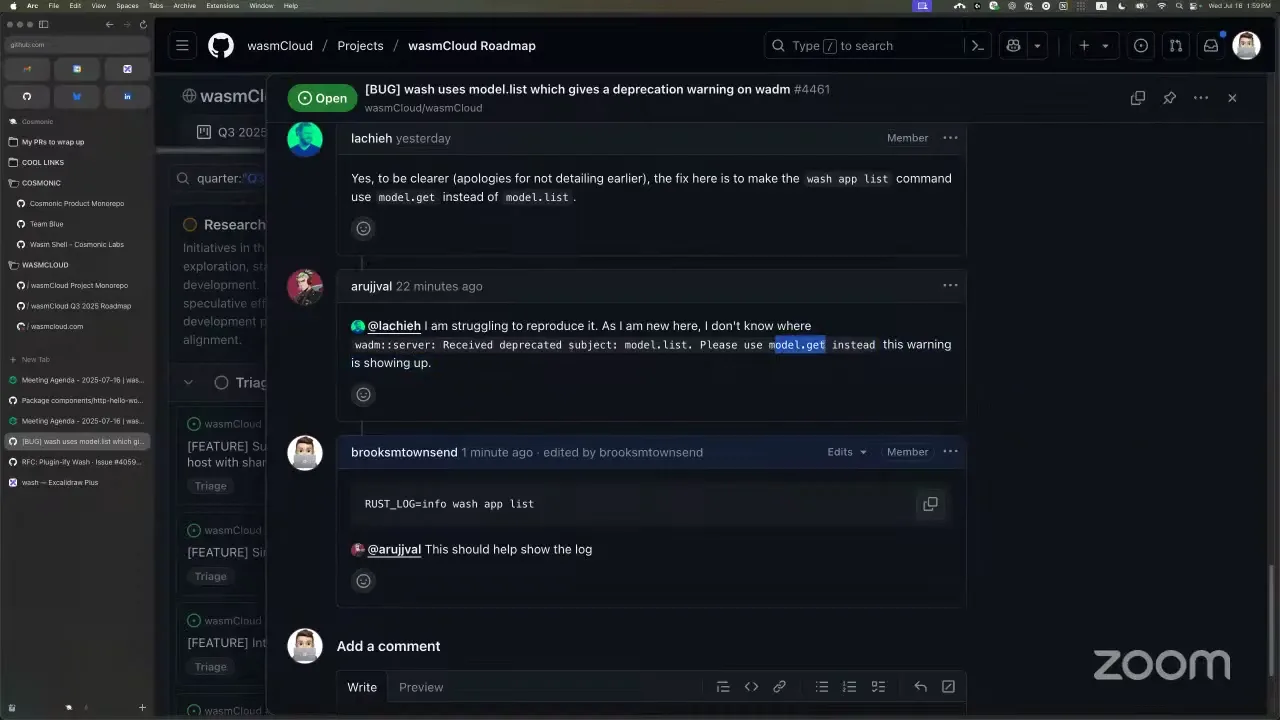
I also wanted to highlight an issue of the week and a documentation page of the week. The issue of the week is the only good first issue on our roadmap right now, so it's a great one to take a look at. arujjwal, it looks like you're already on this one, which is awesome. This warning shows up when you have a RUST_LOG directive enabled — if you do RUST_LOG=info and then wash app list, it'll reproduce. Did you try this one already?
arujjwal 57:13
First of all, hi Brooks. Yeah, I was checking how to do it. I found it very hard to find where the wash repo is, because I think it was archived and then moved to the main repo. So I figured it out about half an hour ago, and that's when I commented.
Brooks Townsend 57:37
Gotcha. So what we have here is, when you enable logging, wash shows this warning. The ask is that we should use the model.get endpoint instead of model.list. Once you take care of this one, you won't see this warning anymore.
arujjwal 58:14
Okay, I will look into it.
Brooks Townsend 58:16
Thank you so much for taking the initiative on this one — let us know if you have any other questions. That's really good feedback about the wash repository, too. For a little history: we basically moved all of our Rust projects into the wasmCloud repository. We added a note, and maybe we could put it in the description too, so sorry for the confusion.
The last but certainly not least, very exciting documentation of the week is under our contributing guide. Thank you so much, Eric. We now have a community wasmCloud room in Excalidraw. If you're making diagrams about wasmCloud — whether you want to contribute a diagram to the wasmCloud documentation or show off wasmCloud inside your organization — you can take a look at our shared Excalidraw room. Some of the diagrams from the roadmapping session are in the actual documentation now. This is what we use, and it's a great place to grab assets and make diagrams; you should be able to copy and paste these into your own canvas. The only thing left is to get Aditya in as an editor so he can add the component-based diagrams. So thank you, Eric, for getting this in — it's under the contributing documentation guide.

Woohoo, we did it. We're actually over time now, so thanks everybody for coming and listening for a while. Exciting stuff — the roadmap is going pretty well, exciting moves on wash and the community in general. Thanks everybody. Hope you have a great rest of your week. Have a wasmCloud day.